
WhatsApp Business API in India: The Meta Document Checklist for Verification
WaZappy · 6 August 2026 · 7 min read
In this article15 sections
- Key Takeaways
- Why Does Meta Need Your Documents?
- Understanding Meta's Verification Needs
- Essential Documents for WhatsApp Business API Approval in India
- 1. Business Registration Proof
- 2. Business Address Proof
- 3. Government-Issued ID of Business Owner/Authorized Person
- 4. Website or E-commerce Store Link
- 5. GST Registration Certificate (Highly Recommended)
- The Meta Business Manager Setup
- What About the WhatsApp Green Tick Verification?
- WaZappy Makes API Setup Easy
- Common Pitfalls and How to Avoid Them
- Frequently asked questions
- What to do next
Key Takeaways
Key takeaways
- To get the WhatsApp Business API in India, you need to verify your business with Meta using official documents.
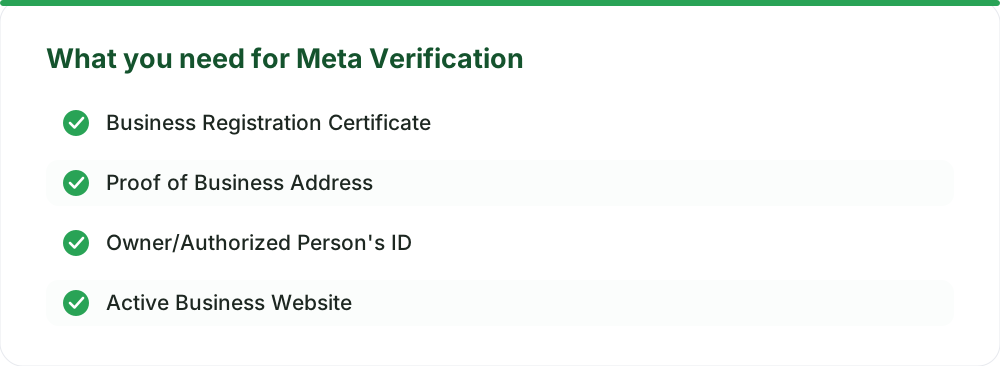
- Essential documents include business registration proof, address proof, owner's ID, and a website link.
- A GST certificate is highly recommended for Indian businesses seeking API approval.
- While API access verification can be quick, the green tick verification is a separate, longer process.
Why Does Meta Need Your Documents?
You want to use the WhatsApp Business API in India. Maybe the regular WhatsApp Business app feels too limited. Or you need to connect with customers at scale. The first hurdle is getting approved by Meta. This involves a verification process. What documents does Meta actually need? We’ve been through this process. It’s straightforward if you have the right paperwork ready. Meta needs to confirm your business is legitimate. This keeps the platform secure and trustworthy. For Indian businesses, this means providing specific documents. These prove your identity and operational status. Having these ready upfront speeds up your WhatsApp Business API setup significantly.
Understanding Meta's Verification Needs
Meta's main goal is to confirm your business exists and is legitimate. They want to ensure you're a real entity, not a bot or scam. This process builds user trust. Verified businesses appear more credible. It also helps prevent spam and abuse. Crucially, it’s a prerequisite for advanced features, like the WhatsApp green tick verification. The core of this verification is your Meta Business Manager account. This is where you link your WhatsApp Business Account (WABA). So, getting your Meta Business Manager set up correctly is step one.
Essential Documents for WhatsApp Business API Approval in India
Meta's requirements can be broad. For Indian businesses, the focus is on official government-issued documentation. The exact requirements can vary, but these are generally what you’ll need.
1. Business Registration Proof
This is the most critical document. It proves your business is officially registered in India. The specific document depends on your business structure.
- For Companies (Private Limited, LLP): Certificate of Incorporation issued by the Registrar of Companies (RoC).
- For Sole Proprietorships: A registration certificate from the relevant local authority. This might be a Shop and Establishment Act license or similar.
- For Partnerships: Partnership Deed and, if applicable, a registration certificate.
The business name on this document must exactly match the name you provide to Meta. This consistency is vital for approval.
2. Business Address Proof
You need to prove you have a physical business location. Accepted documents usually include:
- Utility Bills (Electricity, Water, Gas) in the business name, not older than 3 months.
- Business Bank Statement showing the business name and address.
- Rental Agreement for the business premises.
Again, the address must match what you've registered your business with. An exact match avoids delays.
3. Government-Issued ID of Business Owner/Authorized Person
Meta may ask for identification from the person managing the WhatsApp Business account or the business owner. This helps verify the identity of the individual associated with the business.
- Aadhaar Card
- PAN Card
- Passport
- Voter ID Card
Ensure the ID is clear and valid.
4. Website or E-commerce Store Link
Meta often checks your online presence. A functional website or an active e-commerce store link is usually required. This serves as another layer of verification for your business operations. Ensure your website clearly displays your business name and contact information. If your website is still under development, this can be a point of friction. You might need to wait until it’s live and has sufficient business details.
5. GST Registration Certificate (Highly Recommended)
While not always explicitly listed as mandatory for initial API access, having your GST registration certificate is highly recommended for Indian businesses. It's a strong indicator of a legitimate, registered business. It also simplifies any financial transactions related to the API, such as paying Meta's conversation charges or any platform fees. For any serious business operation in India, GST is a must. You can find more details about GST and its importance for businesses in India on the official government GST portal.
The Meta Business Manager Setup
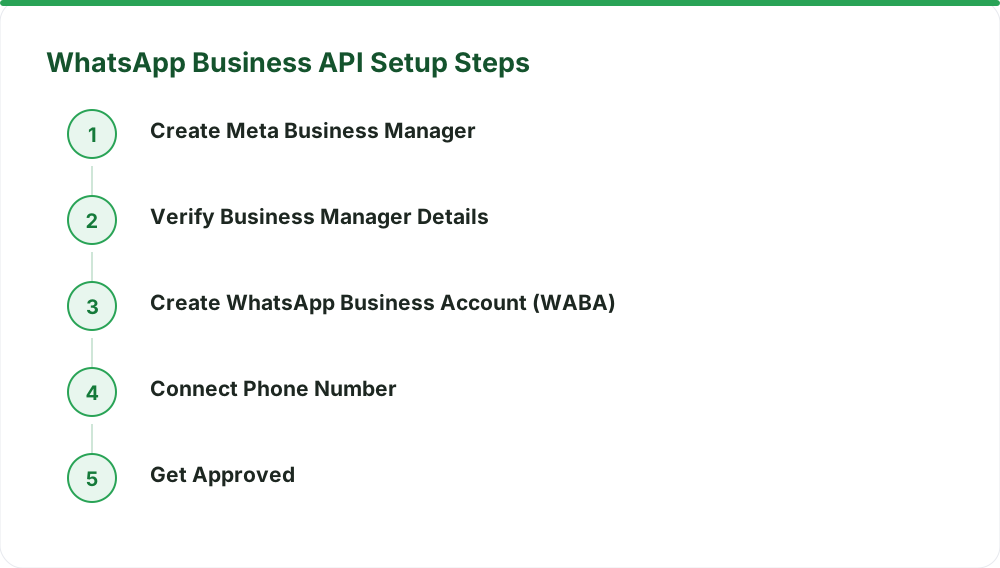
Before you submit documents, you need a verified Meta Business Manager account. Here’s a quick rundown:
- Create or Access Business Manager: Go to business.facebook.com. If you don't have one, create it. If you do, ensure your business details are accurate.
- Verify Your Business: Within Business Manager settings, navigate to 'Business Info'. Here, you'll initiate the business verification process by uploading the required documents.
- Create a WhatsApp Business Account (WABA): Once your Business Manager is verified, create a WABA within it.
- Add Your Phone Number: This is the number you'll use for the WhatsApp Business API. It cannot be active on the regular WhatsApp or WhatsApp Business app.
The verification of your Business Manager itself requires the documents. Meta reviews these to confirm your business details. This is where most of the document-based checks happen.
What About the WhatsApp Green Tick Verification?
It's important to distinguish between business verification for API access and the WhatsApp green tick verification. The documents listed above are primarily for the former – getting your business approved to use the API. The green tick is an additional layer of verification that signifies an official, well-known brand. It requires a more rigorous review by Meta and is usually granted to businesses with significant brand recognition and a strong presence. Getting the green tick is a separate process. While the initial business verification documents lay the groundwork, Meta looks for different criteria for the green tick, such as brand authenticity, uniqueness, and completeness. You can learn more about the green tick process on the official WhatsApp Business help pages.
| Feature | WhatsApp Business App | WhatsApp Business API |
| Number of Agents | 1 (tied to one phone/device) | Unlimited |
| Automation | Basic greetings/away messages | Advanced chatbots, automated flows |
| Broadcasts | Limited to contacts | To opted-in lists (via templates) |
| Catalog & Payments | Basic catalog, no direct UPI | Rich catalog, integrated UPI payments |
| Team Collaboration | None | Shared team inbox, agent assignment |
| API Access | No | Yes (for integrations) |
The API offers far more power for scaling your customer communication.
WaZappy Makes API Setup Easy
Navigating Meta's verification and setup process can seem daunting. That’s where a trusted Meta Tech Provider comes in. Infrared Techno, the company behind WaZappy, is an official Meta Tech Provider on the WhatsApp Business Platform (Cloud API). We streamline the entire process, from document submission to getting your API live. Our platform helps ensure you have the right documentation and meet all requirements for swift approval. This means you can start engaging customers on WhatsApp much faster.
Start free on WaZappy
Common Pitfalls and How to Avoid Them
Many businesses encounter issues during verification. Here are common problems and how to sidestep them:
- Mismatched Information: Business name, address, or owner details don't align across documents or what you've entered in Meta Business Manager. Ensure absolute consistency.
- Outdated Documents: Utility bills or other proofs are too old (usually older than 3 months). Always use recent documents.
- Unclear Scans/Photos: Documents are blurry, cropped, or hard to read. Use clear, high-resolution scans or photos.
- Incorrect Business Structure Proof: Uploading a document not suitable for your specific business type (e.g., providing a proprietorship document for a Pvt Ltd company).
- Website Issues: Website is under construction, has broken links, or doesn't clearly show business contact details.
Double-checking everything before submission saves a lot of time and back-and-forth with Meta. Understanding the requirements for WhatsApp Business API approval in India is key.
Frequently asked questions
Do I need a separate phone number for WhatsApp Business API?
Yes. The phone number you intend to use for the API cannot be active on the regular WhatsApp app or the free WhatsApp Business app. You can migrate an existing number, but it must be disconnected from those apps first. This ensures a clean transition to the API.
How long does the WhatsApp Business API approval take?
Once your documents are submitted and correct, Meta's review for API access is usually quick, often within the same day or a few business days. The green tick verification, however, is a separate process and can take longer, sometimes up to a couple of weeks.
Is there a setup fee for WhatsApp Business API?
There is no mandatory setup fee charged by Meta for API access. Assisted setup services, like help with verification and initial configuration, are optional and may incur a one-time fee. At WaZappy, assisted setup is optional at ₹2,499 + GST, charged once.
What to do next
Gathering the correct documents is the most crucial step towards getting your business verified on the WhatsApp Business API. Ensure all your business details are consistent across all paperwork and your Meta Business Manager profile. Once you have everything ready, you're well on your way to leveraging the power of WhatsApp for your business communications in India. Explore WaZappy's advanced features like no-code automation and AI chatbots to make the most of your API access.
Read next
All WhatsApp Business API guides →WhatsApp Flows: Capture Leads & Orders Instantly In-Chat
Learn how WhatsApp Flows transform lead capture and order processing, turning chats into powerful sales tools for Indian businesses.
WhatsApp for Real Estate: Reply to Leads Before They Go Cold
Don't let real estate leads go cold. Discover how the WhatsApp Business API provides instant responses, qualifies buyers, and boosts conversions.
WhatsApp for Restaurants: Direct Orders Without the Aggregator Commission
Stop paying hefty commissions to food aggregators. Learn how to use the WhatsApp Business API to take direct orders, boost repeat business, and own your customer relationships.
Want this on your WhatsApp?
WaZappy is the WhatsApp Business API platform with every advanced feature built in — start free and connect your number in minutes.
Start free on WaZappy