
WhatsApp Green Tick Verification in India: What It Takes and How Long It Really Takes
WaZappy · 6 August 2026 · 8 min read
In this article16 sections
- Key Takeaways
- Why Businesses in India Chase the WhatsApp Green Tick
- What Exactly is the WhatsApp Green Tick?
- Why Businesses in India Need This Badge of Trust
- Getting Ready: Your WhatsApp Business API Setup
- What Meta Looks for in Green Tick Verification
- 1. Official Business Presence
- 2. Brand Recognition and Authority
- 3. Facebook Page Approval
- 4. Compliance with WhatsApp Policies
- How to Apply for Your WhatsApp Green Tick
- How Long Does WhatsApp Green Tick Verification Really Take?
- WhatsApp Business API Approval vs. Green Tick Verification
- Common Mistakes to Avoid in Verification
- Frequently asked questions
- What to do next
Key Takeaways
Key takeaways
- The WhatsApp green tick signifies an authentic business presence, building customer trust.
- Getting verified requires a strong, established public presence and Meta's approval; it's not a quick process.
- You must first be approved for the WhatsApp Business Platform (API); green tick verification is a separate step.
- The timeline for green tick verification varies, typically taking days to a couple of weeks, entirely at Meta's discretion.
Why Businesses in India Chase the WhatsApp Green Tick
You see it next to some business names on WhatsApp: that little green tick. It instantly signals legitimacy. It tells customers, "This is the real deal." For businesses in India, this badge of authenticity is highly desirable. It builds trust, a critical currency in any market, especially ours. But how do you actually get it? And more importantly, how long does it really take? Let's cut through the noise and get to the facts.
The truth is, the green tick is a signal of authenticity. It tells customers they are talking to the official business, not a fake account. This builds trust instantly. It's not about paying more money; it's about meeting Meta's standards.
What Exactly is the WhatsApp Green Tick?
The WhatsApp green tick is a badge of authenticity. It appears next to a business's name in your chat list and on their profile. It signifies that Meta has confirmed the business is real and represents the authentic presence of the brand it claims to be. It's different from the blue tick on other social media platforms. On WhatsApp, it specifically means the business is legitimate and using the official WhatsApp Business Platform (formerly API).
It’s a powerful signal of trust for your customers. In India, where trust is paramount, this can make a significant difference in customer engagement.
Why Businesses in India Need This Badge of Trust
In India, trust is paramount for businesses. A green tick offers several concrete benefits:
- Builds Trust: Customers are more likely to engage with a verified business. They know it’s official.
- Enhances Credibility: It sets you apart from competitors and potential scammers.
- Improves Brand Image: It signals a professional and established business.
- Reduces Support Load: Customers are more confident they are talking to the right entity, potentially reducing confusion and basic queries.
Getting Ready: Your WhatsApp Business API Setup
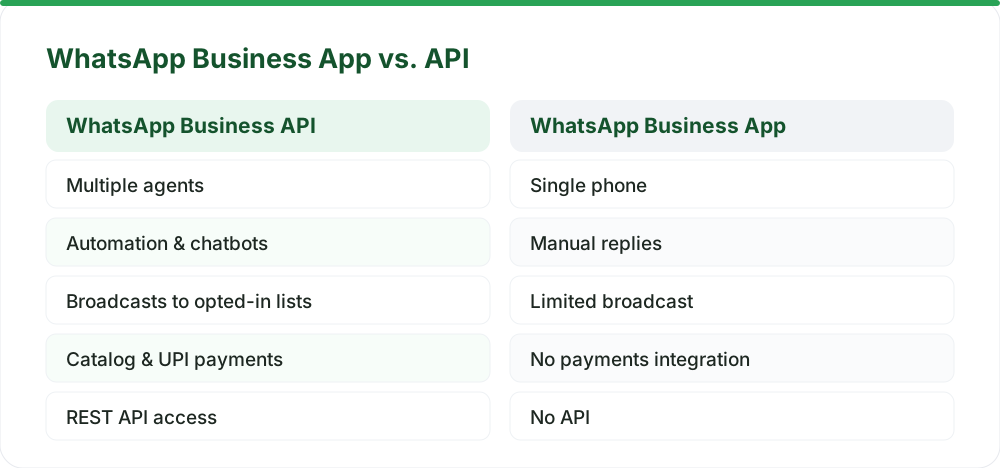
Before you can even think about the green tick, you need to be on the official WhatsApp Business Platform. This is the enterprise-grade solution for businesses, not the free WhatsApp Business app you download from the Play Store. Getting your WhatsApp Business API setup is the foundational step.
Here’s a simplified look at the process for how to get WhatsApp Business API in India:
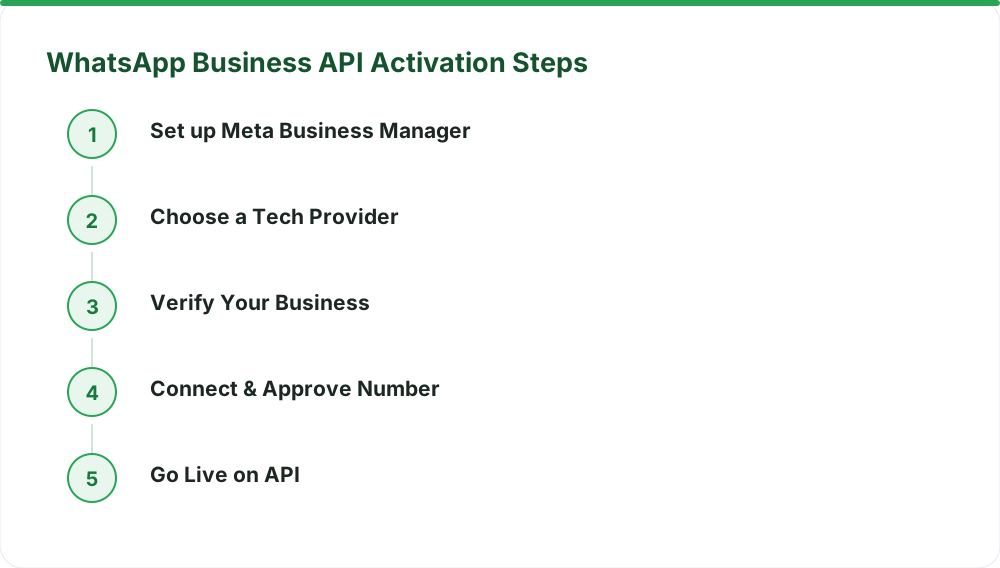
- Set up Meta Business Manager: You need to own or have admin access to a Meta Business Manager account.
- Choose a WhatsApp Tech Provider: You need a partner to help you connect. Infrared Techno is a Meta Tech Provider. Our product, WaZappy, is a leading platform for businesses in India.
- Verify Your Business with Meta: This involves submitting business documents to Meta for verification.
- Get Your Phone Number Approved: The number you want to use for WhatsApp Business API cannot be active on the regular WhatsApp or WhatsApp Business app. An existing number can be migrated.
- API Activation: Once Meta approves your business and number, your API access is activated. Most businesses are live the same day.
There is no setup fee for the WhatsApp Business API itself. However, assisted setup is optional and costs ₹2,499 + GST, charged once. You also get a free plan with no expiry, with limits detailed on our pricing page.
Ready to connect with your customers on WhatsApp? Start free on WaZappy.
What Meta Looks for in Green Tick Verification
Meta's verification process for the green tick is rigorous. They want to ensure that businesses are genuine and have a significant, established public presence. Here’s what they generally assess:
1. Official Business Presence
Your business must have an established presence across multiple official channels. This includes:
- A professional website.
- Presence on other social media platforms (Facebook Page, Instagram, LinkedIn, Twitter).
- Presence in online news articles or reputable publications.
A website with clear contact information and a professional design is crucial. Social media profiles should be active and reflect your brand identity. A strong online footprint is key.
2. Brand Recognition and Authority
Meta needs to see that your brand is well-known and authoritative in its sector. This means your business should be:
- Frequently mentioned in news articles from major, reputable publications.
- Recognized by a significant audience.
- Not relying solely on paid advertisements or your own social media channels for visibility.
Think about it: are people searching for your brand name? Are reputable news outlets writing about you organically? This is a major factor. You can learn more about what Meta considers official documentation on their Meta Business Help Center.
3. Facebook Page Approval
Your Facebook Business Page must be approved and linked to your Meta Business Manager. It needs to be active and represent your brand accurately. This page often serves as a primary point of reference for Meta during their review.
4. Compliance with WhatsApp Policies
Your business must adhere to WhatsApp's Commerce Policy and Business Policy. This means you cannot be in a prohibited business category. Your messaging practices must also be compliant. For example, you can't send unsolicited marketing messages without opt-in.
How to Apply for Your WhatsApp Green Tick
The application for the green tick is typically done through your chosen WhatsApp Business Tech Provider. Since Infrared Techno is a Meta Tech Provider, our platform, WaZappy, helps streamline this process. We guide you through the necessary steps and documentation.
The process usually looks like this:
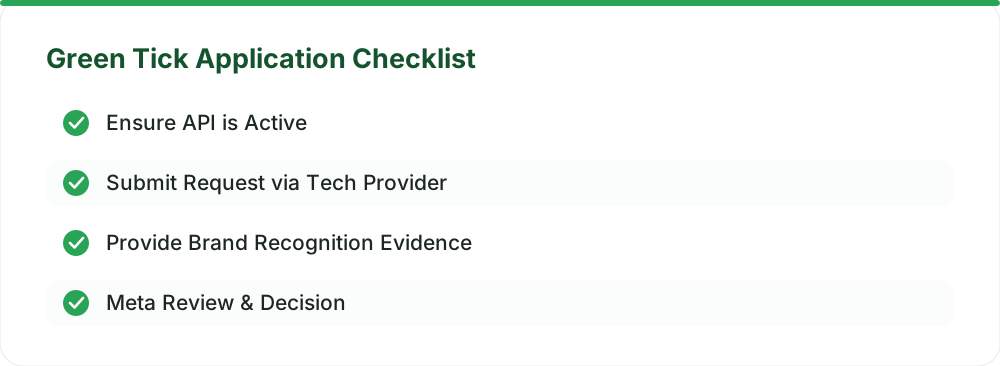
- Ensure API is Active: You must be live on the WhatsApp Business Platform first.
- Submit Request via Tech Provider: Your Tech Provider will initiate the verification request within Meta's systems.
- Provide Supporting Documents: You'll need to provide evidence of your brand's public recognition. This might include links to news articles, your website, and active social media profiles.
- Meta Review: Meta’s team will review your application and the provided evidence.
How Long Does WhatsApp Green Tick Verification Really Take?
This is where expectations need to be managed. There's no magic button, and no provider can speed it up. The WhatsApp green tick verification timeline can vary significantly. Generally, it takes anywhere from a few days to a couple of weeks. Factors influencing the timeline include:
- Completeness of your application: Providing all required information upfront speeds things up.
- Meta's review queue: High volumes of applications can lead to longer wait times.
- Quality of evidence: Strong, verifiable proof of brand recognition is key.
- Business category: Some industries might face a more detailed review.
It's crucial to understand that no provider can guarantee or shorten this review period. It is entirely up to Meta's discretion and their internal processes. This is why having a robust online presence before applying is essential.
WhatsApp Business API Approval vs. Green Tick Verification
It’s important to distinguish between WhatsApp Business API approval and green tick verification. API approval is about getting access to the platform to send messages. Green tick verification is about getting that badge of authenticity.
You can be live on the WhatsApp Business API without the green tick. Many businesses operate successfully this way. The green tick is an optional, though desirable, layer of trust. Many businesses in India achieve significant customer engagement and conversions using the API without the badge.
WaZappy makes getting started on the WhatsApp Business Platform straightforward. Our platform helps manage your API connection, message templates, and customer interactions, laying the groundwork for potential verification. You can explore all our advanced features, including automation and no-code flows, on our features page.
Common Mistakes to Avoid in Verification
Many businesses stumble during the verification process. Here are common pitfalls:
- Lack of Brand Recognition: Assuming your business is known enough without proof.
- Using the Wrong WhatsApp Product: Trying to get verified while still on the free WhatsApp Business app.
- Incomplete Documentation: Not providing sufficient evidence of authenticity.
- Not Being Live on the Platform: Applying for verification before your WhatsApp Business API is active.
- Policy Violations: Engaging in prohibited business activities or spammy messaging.
Frequently asked questions
Is WhatsApp green tick verification free?
The verification process itself, managed by Meta, does not have a direct fee. However, you must be using the official WhatsApp Business Platform, which may involve costs depending on your usage and provider. WaZappy offers a free plan and transparent pricing for API access.
Can I get the green tick for my personal WhatsApp number?
No. The green tick is exclusively for businesses using the official WhatsApp Business Platform. Personal numbers and the standard WhatsApp Business app are not eligible for this verification.
What if my green tick application is rejected?
If your application is rejected, Meta usually provides a reason. You can address the issues raised, strengthen your evidence of brand recognition, and reapply after some time. It’s often a process of building more public presence and resubmitting.
What to do next
Getting started with the WhatsApp Business Platform is the first step towards enhanced customer communication and potential green tick verification. Focus on building your business's official presence and ensuring you meet Meta's authenticity standards. Once you're on the API, you can leverage powerful tools for engagement and sales.
Read next
All WhatsApp Business API guides →WhatsApp Flows: Capture Leads & Orders Instantly In-Chat
Learn how WhatsApp Flows transform lead capture and order processing, turning chats into powerful sales tools for Indian businesses.
WhatsApp for Real Estate: Reply to Leads Before They Go Cold
Don't let real estate leads go cold. Discover how the WhatsApp Business API provides instant responses, qualifies buyers, and boosts conversions.
WhatsApp for Restaurants: Direct Orders Without the Aggregator Commission
Stop paying hefty commissions to food aggregators. Learn how to use the WhatsApp Business API to take direct orders, boost repeat business, and own your customer relationships.
Want this on your WhatsApp?
WaZappy is the WhatsApp Business API platform with every advanced feature built in — start free and connect your number in minutes.
Start free on WaZappy