
Setting Up a Shared WhatsApp Team Inbox: Never Leave a Customer Waiting
WaZappy · 1 October 2026 · 7 min read
In this article12 sections
- Stop Customer Support Chaos: The Shared WhatsApp Inbox Solution
- Why the WhatsApp Business App Falls Short
- The Path to a Shared Inbox: WhatsApp Business API
- Step 1: Migrate to the WhatsApp Business API
- Step 2: Choose a Shared Inbox Platform
- Step 3: Set Up Your Team and Workflows
- Essential Features for Team Collaboration
- Leveraging Automation for Efficiency
- WhatsApp Business API Pricing in India
- Beyond Support: WhatsApp for Sales and Marketing
- Frequently asked questions
- What to do next
Stop Customer Support Chaos: The Shared WhatsApp Inbox Solution
Are your customer queries on WhatsApp getting lost in the shuffle? Does your team struggle to keep track of who’s handling which conversation? If you're using the standard WhatsApp Business app, you're likely facing these challenges. While convenient for a single user, it doesn't scale. Customers expect instant replies, and missed messages mean lost opportunities and frustrated clients. Setting up a shared WhatsApp team inbox is the answer to managing high volumes of customer messages efficiently and ensuring no one is left waiting.
A shared inbox consolidates all your customer conversations from a single WhatsApp Business number into one accessible platform for your entire support team. Everyone can see the queue, claim chats, and reply, eliminating confusion and duplicate efforts. This is crucial when you consider that over 175 million people message WhatsApp Business accounts daily in India alone. Let's break down how to get this essential system in place.
Key takeaways
- A shared WhatsApp inbox allows multiple agents to manage conversations from a single number simultaneously.
- It prevents missed messages, reduces customer wait times, and improves team efficiency.
- Setting it up involves migrating to the WhatsApp Business API and choosing a platform like WaZappy.
- Key features include chat assignment, internal notes, and automation capabilities.
Why the WhatsApp Business App Falls Short
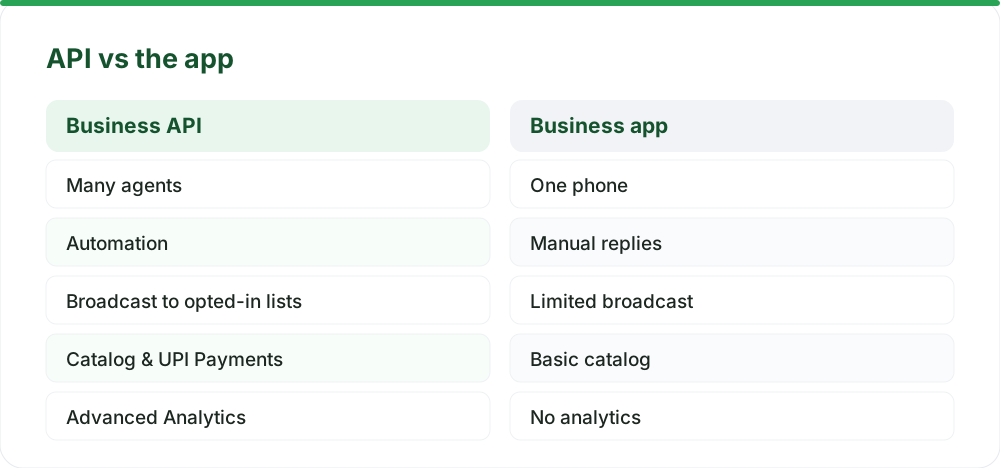
Many businesses start with the free WhatsApp Business app. It’s easy to set up and use for a single agent. However, its multi-device feature isn't a true shared inbox. It means multiple people can view chats on different devices, but there’s no way to track who is replying or if a conversation has been handled. This leads to agents replying to the same message or, worse, no one replying at all. For businesses experiencing growth, or those in competitive sectors like e-commerce or customer service, this quickly becomes unmanageable. You need a system that provides visibility and accountability.
The Path to a Shared Inbox: WhatsApp Business API
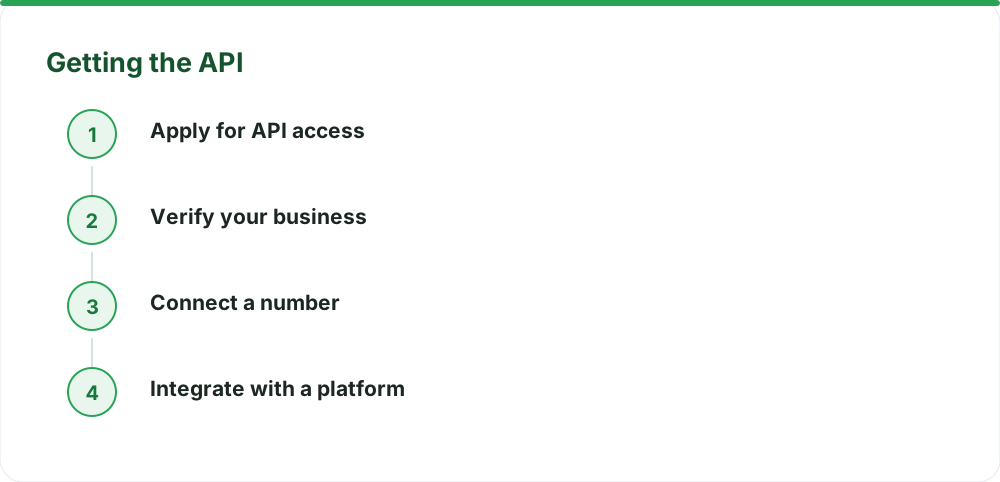
To achieve a true shared team inbox, you must move beyond the basic app and leverage the WhatsApp Business API. This is the enterprise-grade solution for businesses that need advanced features and scalability. Here’s the general process:
Step 1: Migrate to the WhatsApp Business API
First, you need to get your business number onto the API. If you're already using the number with the WhatsApp Business app, you'll need to migrate it. This process ensures you don't lose chat history. You can't have the same number active on both the app and the API simultaneously. Infrared Techno, the company behind WaZappy, is a Meta Tech Provider on the official WhatsApp Business Platform (Cloud API), ensuring a smooth transition.
Step 2: Choose a Shared Inbox Platform
Once you have API access, you need a platform that provides the shared inbox functionality. This is where a service like WaZappy comes in. These platforms connect to your WhatsApp Business API and offer a user-friendly interface for your team. They handle the complexities of the API, allowing you to focus on customer interactions.
Step 3: Set Up Your Team and Workflows
After selecting a platform, you’ll invite your team members. You can assign roles and permissions to manage who can see and do what within the inbox. Crucially, you can configure routing rules. This means incoming messages can be automatically assigned to specific agents or teams based on keywords, customer type, or time of day. This ensures the right person handles the query promptly.
Essential Features for Team Collaboration
A robust shared inbox isn't just about multiple people seeing messages. It’s about enabling effective collaboration and efficient workflows. Look for platforms that offer:
- Multi-agent access: The core of a shared inbox, allowing concurrent management.
- Chat assignment and routing: Automatically or manually assign conversations to team members.
- Internal notes and collaboration: Agents can add private notes to chats for context or discuss issues internally without the customer seeing.
- Real-time analytics: Track key metrics like response times, resolution rates, and agent performance. This helps identify bottlenecks and areas for improvement.
- Saved replies/Quick replies: Create pre-written responses for common questions to ensure speed and consistency.
Leveraging Automation for Efficiency
To truly supercharge your support, integrate WhatsApp automation. Chatbots can handle frequently asked questions (FAQs) instantly, qualify leads, or gather initial information before handing over to a human agent. This frees up your team for more complex or high-value interactions. AI chatbots can effectively handle 70-80% of routine customer inquiries.
WaZappy's no-code flow builder makes it easy to design and implement these automated workflows. You can create custom chatbot experiences tailored to your business needs, ensuring customers get instant help even outside business hours. Start free on WaZappy and see how simple automation can be.
WhatsApp Business API Pricing in India
Understanding the costs is important. Meta charges based on conversations, not individual messages. There are different rates for marketing, utility, and authentication messages. Businesses get 1,000 free service messages per month. After that, service messages (replies within a 24-hour customer window) have a per-message charge. Importantly, conversations initiated via click to WhatsApp ads or from your website often fall into a free 72-hour entry-point window, meaning the initial customer interaction is free for you.
Beyond Meta's conversation charges, your chosen platform will have its own fees. Some plans start around ₹999 per month. It's crucial to choose a provider that offers transparent pricing with no hidden markups on Meta's charges. WaZappy provides clear pricing details, ensuring you know exactly what you’re paying for.
| Message Type | Approx. Cost (INR) | Notes |
|---|---|---|
| Free Service Messages | ₹0 | First 1,000 per month |
| Service Messages (after free tier) | ₹0.1150 - ₹0.145 | Replies within 24-hr window |
| Marketing Messages | ₹0.8631 - ₹0.90 | Initiated by the business |
| Utility & Authentication | ₹0.1150 - ₹0.13 | Pre-approved templates |
| 72-Hour Entry Point Window | ₹0 | Customer-initiated conversations (e.g. from ads) |
Beyond Support: WhatsApp for Sales and Marketing
A shared inbox also boosts sales. With features like the WhatsApp catalog, you can showcase products directly in the chat. Customers can browse, add items to a cart, and even complete purchases using integrated WhatsApp catalog UPI payments. This streamlines the buying process significantly. WhatsApp Pay alone processed over 167 million UPI transactions in July 2026, highlighting its adoption for commerce.
For proactive outreach, explore WhatsApp broadcast software. While the free app has strict limits, the API allows sending messages to large, opted-in lists using pre-approved templates. This is ideal for sending order updates, promotions, or important notifications. Always ensure you have explicit customer consent before sending broadcast messages to avoid account issues.
Frequently asked questions
What is a shared WhatsApp inbox?
A shared WhatsApp inbox is a system that allows multiple team members to manage customer conversations originating from a single WhatsApp Business number. It provides a unified view of all chats, enabling agents to assign, track, and respond to messages collaboratively.
Can I use the regular WhatsApp Business app as a shared inbox?
No, the standard WhatsApp Business app does not support a true shared inbox. Its multi-device feature allows access on multiple phones but lacks the crucial features for team collaboration like chat assignment, tracking, and unified queues.
How much does it cost to set up a shared WhatsApp inbox?
The cost involves WhatsApp Business API access fees (which are per-conversation charges from Meta) and platform fees for the shared inbox solution. Meta provides 1,000 free service messages per month. Platform costs can start around ₹999 per month, depending on the provider and features. There is no setup fee for API access itself.
Is WhatsApp automation difficult to set up?
With a no-code platform like WaZappy, setting up WhatsApp automation is straightforward. You can build custom chatbot flows and automated responses without needing to write any code, making it accessible for businesses of all technical levels.
What to do next
Setting up a shared WhatsApp team inbox is a vital step for any business looking to provide excellent customer service and drive sales through WhatsApp. By migrating to the WhatsApp Business API and using a dedicated platform, you can transform your customer communication. Ready to stop missing messages and start delighting customers? Explore WaZappy's advanced features for your business.
Read next
All WhatsApp Business API guides →Answer Customer Questions with AI on WhatsApp from Your Knowledge Base
Leverage AI on WhatsApp to instantly answer customer questions using your own knowledge base. Discover how to set up a WhatsApp chatbot for business that scales, improves efficiency, and offers 24/7 support.
WhatsApp Drip Campaigns: Recovering Abandoned Carts in India
Turn lost sales into revenue. Learn how WhatsApp drip campaigns, powered by automation and UPI payments, can recover abandoned carts for your Indian business.
Cut COD Returns by 40% with WhatsApp Order Confirmation
Reduce COD returns and fake orders with a smart WhatsApp order confirmation flow. Learn how real-time verification and interactive messages can save your business money and improve customer experience.
Want this on your WhatsApp?
WaZappy is the WhatsApp Business API platform with every advanced feature built in — start free and connect your number in minutes.
Start free on WaZappy