
Sell Directly on WhatsApp: Catalog, Cart, and UPI Payments for Indian Businesses
WaZappy · 27 August 2026 · 6 min read

In this article8 sections
- Turn Your WhatsApp into a Storefront: Catalog, Cart & UPI
- How WhatsApp Catalogs and Carts Work
- Integrating UPI Payments for Instant Transactions
- Getting Started with the WhatsApp Business Platform API
- Choosing the Right Platform for Your WhatsApp Sales
- Automating Sales with WhatsApp Chatbots and Broadcasts
- Frequently asked questions
- What to do next
Key takeaways
- You can sell products directly on WhatsApp using its catalog and cart features, with UPI payment integration for Indian customers.
- Setting this up requires the WhatsApp Business Platform API and a tool to manage your catalog, orders, and payments.
- Customers can browse products, add them to a cart, and pay instantly via UPI without leaving the WhatsApp app.
Turn Your WhatsApp into a Storefront: Catalog, Cart & UPI
Are you tired of customers asking for product details repeatedly? Do you wish you could just show them what you sell, right on WhatsApp? Many businesses in India face this. They use WhatsApp for customer service, but selling feels like a back-and-forth hassle.
Customers ask for prices, images, and availability. You send them details one by one. It’s slow. It’s prone to errors. You lose sales because it’s just too much effort for the buyer. What if you could turn your WhatsApp chat into a storefront? Imagine customers browsing your products, adding them to a cart, and paying, all within the app. This is now possible. You can set up a **WhatsApp catalog** and even accept UPI payments directly. This makes buying from you as easy as sending a message.
How WhatsApp Catalogs and Carts Work
WhatsApp’s catalog feature lets you showcase your products or services directly within the app. Think of it like a mini-website living inside your WhatsApp Business profile. Each item can have a name, description, price, and an image. Customers can view your catalog without leaving their chat with you.
Once they see something they like, they can add it to their cart. The cart collects all the items a customer wants to buy. When they’re ready, they can send the entire cart to you as a message. This message includes all the items and quantities. It’s a clear order summary. It reduces misunderstandings and speeds up the sales process significantly.
Integrating UPI Payments for Instant Transactions
For businesses in India, UPI is king. It’s fast, easy, and widely used. The real power comes when you can combine your WhatsApp catalog and cart with UPI payment collection. This means your customer can select products, add them to their cart, and then pay you instantly using their preferred UPI app – all without leaving WhatsApp.
How does this happen technically? When a customer sends you a cart, you can respond with a payment request. This request can include a UPI link or a UPI ID. The customer clicks the link or scans a QR code generated for the payment. Once the payment is confirmed, they inform you, or better yet, the system automatically confirms it. This closes the loop from browsing to payment in minutes.
For Indian businesses, integrating UPI payments directly into the WhatsApp sales flow is a major advantage. It removes friction and caters to customer preferences.
Getting Started with the WhatsApp Business Platform API
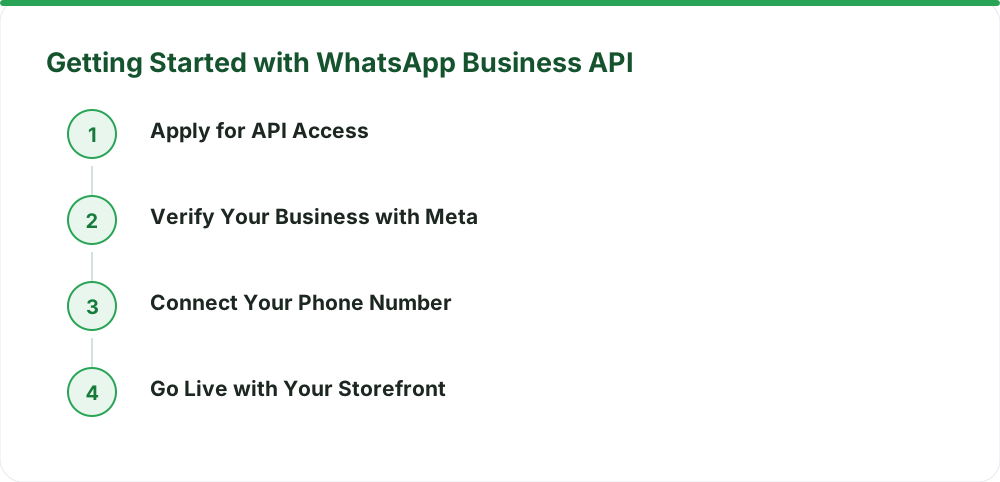
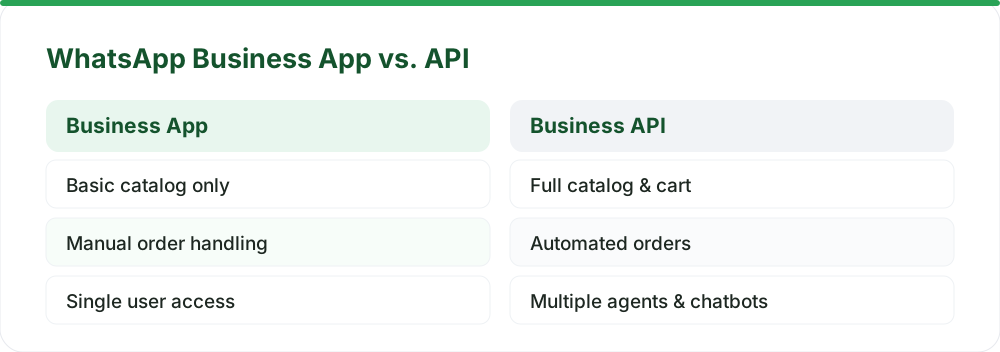
To offer a full catalog and cart experience, you need more than just the basic WhatsApp Business app. You need the WhatsApp Business Platform API. This API allows for advanced features like managing catalogs, handling multiple agents, and automating responses. It’s the backbone for a professional WhatsApp sales channel.
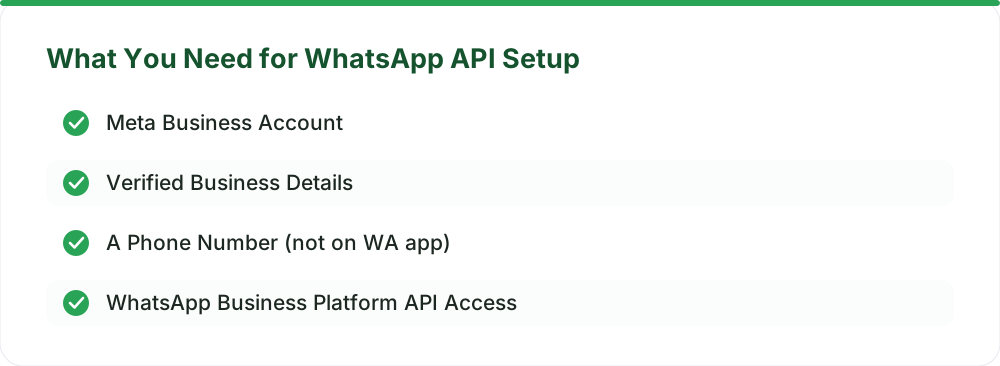
Setting up the API involves a few steps. You need to apply for access through a Meta Tech Provider. Infrared Techno is a Meta Tech Provider on the official WhatsApp Business Platform (Cloud API). We help businesses get set up. You’ll need to verify your business with Meta. Then, you connect a phone number that isn’t currently in use on the WhatsApp app or Business app. A number must not be active on the WhatsApp or WhatsApp Business app; an existing number can be migrated.
Choosing the Right Platform for Your WhatsApp Sales
Managing a WhatsApp catalog, cart, and payments manually can still be challenging. This is where a dedicated platform comes in. You need a tool that integrates with the WhatsApp Business API and provides an easy interface for your business.
Look for a platform that offers:
- Catalog management: Easily upload and update your products.
- Order management: Track incoming orders from carts.
- Payment integration: Connect with UPI payment gateways.
- Automation: Set up auto-replies and basic chatbots.
- Team inbox: Allow multiple team members to handle chats.
This is where WaZappy fits in. We provide a robust platform built on the WhatsApp Business Platform API. You can manage your product catalog, process orders, and integrate UPI payments smoothly. Our **no-code flow builder** lets you create automation without any technical knowledge. Plus, features like AI chatbots and broadcast software are built-in.
Automating Sales with WhatsApp Chatbots and Broadcasts
Beyond just the catalog and cart, automation is key to scaling your WhatsApp sales. A **WhatsApp chatbot for business** can greet customers, answer frequently asked questions about products, and guide them to your catalog. It can even initiate the checkout process.
For existing customers or leads who have opted in, **WhatsApp broadcast software** is invaluable. You can send updates about new products, special offers, or restocked items. This needs to be done carefully, following Meta’s policies on message templates and opt-ins. Using broadcasts effectively can drive repeat business and inform your customer base about new additions to your catalog. Learn more about WhatsApp broadcast best practices.
Click to WhatsApp ads are another powerful tool. You can run ads on platforms like Facebook and Instagram that, when clicked, open a WhatsApp chat with your business. You can pre-fill the message to include details about a specific product they clicked on from the ad, leading them directly to the relevant part of your catalog or a sales conversation.
Frequently asked questions
Can I set up a WhatsApp catalog without the API?
You can create a basic catalog using the free WhatsApp Business app. However, to integrate features like a shopping cart and direct UPI payment links that streamline the entire sales process, you need the WhatsApp Business Platform API. This provides the necessary infrastructure for advanced commerce features.
How long does it take to get the WhatsApp Business API?
Most businesses can get live on the same day once their Meta Business account is verified and they have a suitable phone number. The verification process itself can sometimes take a few days, depending on Meta’s review times. Infrared Techno, as a Meta Tech Provider, helps expedite this process.
Is there a setup fee for the WhatsApp Business API?
Infrared Techno, as a Meta Tech Provider, does not charge a setup fee. Optional assisted setup is available for a one-time fee of ₹2,499 + GST. Meta also charges conversation-based fees directly, which WaZappy does not mark up. You can see detailed costs on our pricing page.
What are Meta's conversation charges?
Meta bills conversation charges directly to the customer at Meta rates. WaZappy adds no markup and does not resell message credits. These charges depend on the category of the conversation (user-initiated or business-initiated) and apply after a free tier. For more details, check out Meta's official WhatsApp pricing documentation.
What to do next
Setting up your WhatsApp catalog, cart, and UPI payments is a significant step towards making WhatsApp your primary sales channel. It brings the shopping experience directly to your customers where they already spend their time. Ready to transform your sales process? Explore the possibilities and see how easy it can be to sell directly on WhatsApp.
Read next
All WhatsApp Business API guides →WhatsApp Automation for D2C and E-commerce Brands in India
Unlock explosive growth for your D2C or e-commerce brand in India with WhatsApp automation. Discover how the WhatsApp Business API can transform customer engagement, boost sales, and streamline operations.
Cut COD Returns by 40% with WhatsApp Order Confirmation
Reduce COD returns and fake orders with a smart WhatsApp order confirmation flow. Learn how real-time verification and interactive messages can save your business money and improve customer experience.
WhatsApp Drip Campaigns: Recovering Abandoned Carts in India
Turn lost sales into revenue. Learn how WhatsApp drip campaigns, powered by automation and UPI payments, can recover abandoned carts for your Indian business.
Want this on your WhatsApp?
WaZappy is the WhatsApp Business API platform with every advanced feature built in — start free and connect your number in minutes.
Start free on WaZappy