
WhatsApp Broadcasts: Master Template Approval, Opt-Outs, and Quality Ratings
WaZappy · 22 August 2026 · 7 min read
In this article9 sections
- Sending Updates on WhatsApp: The Power and The Pitfalls
- Why Template Approval is Non-Negotiable for Broadcasts
- Getting Customer Opt-Ins: The Absolute Foundation
- Understanding WhatsApp Quality Ratings
- Managing Opt-Outs: Keeping Your Quality Score High
- The Trade-offs: Broadcasts vs. Individual Conversations
- What Happens When Your Quality Rating Drops?
- Frequently asked questions
- What to do next
Sending Updates on WhatsApp: The Power and The Pitfalls
Imagine instantly telling your customers about a new product, a flash sale, or critical service updates. WhatsApp makes this possible. It's a direct line to your buyers. But you can't just send messages to everyone. WhatsApp has strict rules to prevent spam. These rules cover message templates, customer consent, and how often you message. Getting them wrong means your messages might not get delivered. Worse, your WhatsApp Business account could be restricted. This guide breaks down exactly how template approval, opt-outs, and quality ratings work in practice.
Key takeaways
- All broadcast messages must use pre-approved Meta templates.
- You need explicit customer opt-in consent before sending broadcasts.
- Your account's quality rating directly impacts your messaging ability.
- Properly managing opt-outs is crucial to maintain a good quality rating.
Why Template Approval is Non-Negotiable for Broadcasts
WhatsApp wants conversations to be user-initiated or about a topic users expect. Broadcasts allow businesses to initiate conversations with many people at once. To manage this, Meta requires you to use pre-approved message templates for all business-initiated messages, including broadcasts. These aren't just generic texts. They are specific formats you submit to Meta for review. They can include placeholders for customer names, order numbers, or product details. For example: "Hi {{1}}, your order #{{2}} has shipped! Track it here: {{3}}".
The approval process checks if your template fits WhatsApp's Commerce Policy. It also checks if it's purely informational or promotional. Templates for appointment reminders, shipping notifications, or account alerts are usually approved quickly. Purely promotional messages can face more scrutiny.
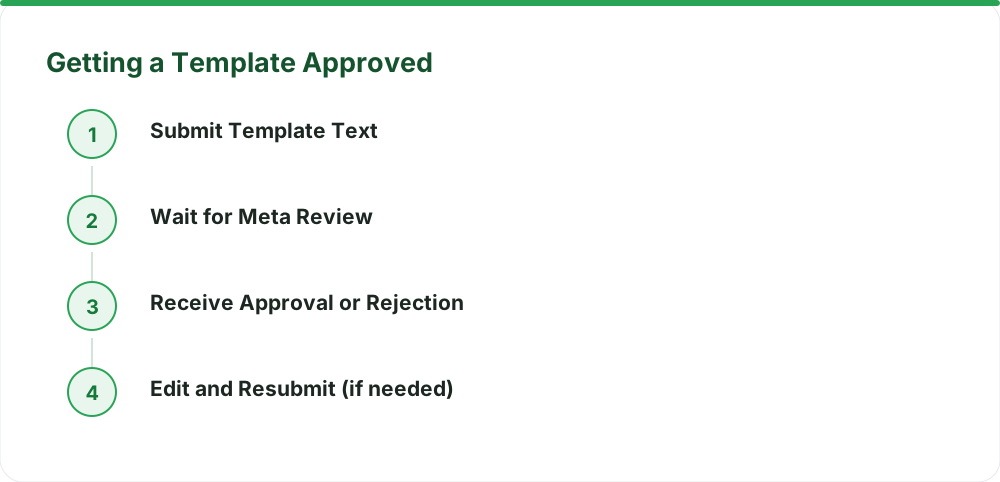
Approval can take anywhere from a few minutes to a few days. Meta provides a reason if a template is rejected, often due to policy violations or unclear placeholders. You can then edit and resubmit. Templates are for notifications, not for sales pitches disguised as updates.
Getting Customer Opt-Ins: The Absolute Foundation
This is critical. You must have explicit consent from your customers before sending them broadcast messages. This is called an opt-in. Simply having a customer's phone number isn't enough. They need to agree to receive messages from your business on WhatsApp.
How do you get this consent?
- Website checkboxes: During checkout or signup, include a clear checkbox. Something like: "Yes, I want updates about my order and special offers via WhatsApp."
- SMS/Email opt-in: If you already have consent via other channels, you can ask them to opt-in via WhatsApp. Send a message like: "We'd love to send you order updates on WhatsApp. Reply YES to subscribe."
- In-person: At your store, ask customers if they want to join your WhatsApp broadcast list.
Crucially, you need to record this opt-in. If Meta questions it, you need proof the customer agreed. This record-keeping is vital for maintaining a good standing.
Understanding WhatsApp Quality Ratings
Meta monitors how businesses use the WhatsApp Business Platform. They assign a quality rating to your phone number. This rating is based on customer feedback and how you conduct your messaging. It directly impacts your ability to send messages. The rating has three levels:
- Green: Everything is good. You can send messages without issue.
- Yellow: You're on notice. You might face limitations soon if things don't improve.
- Red: Action needed. Your messaging ability is restricted. If it doesn't improve, your access could be blocked.
What causes your rating to drop?
- High block rates: If many people block your number after receiving a message.
- High negative feedback: Customers reporting your messages as spam.
- Sending to un-opted-in users: This is a major red flag.
A good quality rating means customers see your messages. A bad rating means they might not. It's a direct feedback loop.
Managing Opt-Outs: Keeping Your Quality Score High
Opt-outs are how customers tell you they no longer want to receive messages. You must respect these immediately. Failure to do so will tank your quality rating. How do customers opt out?
- Keyword-based: They can text back a keyword like "STOP", "UNSUBSCRIBE", or "QUIT".
- Implicitly: If they block your number, that's an automatic opt-out.
Your system needs to detect these opt-out requests and immediately stop sending messages to that number. This is where WhatsApp automation helps. A good WhatsApp Business API platform will automatically flag numbers that opt out. This is where WaZappy excels. Our platform automatically tracks opt-outs and manages your contact lists to ensure compliance. Our no-code flow builder helps you create automated opt-out responses, so you don't have to worry about manual tracking. Start free on WaZappy.
The Trade-offs: Broadcasts vs. Individual Conversations
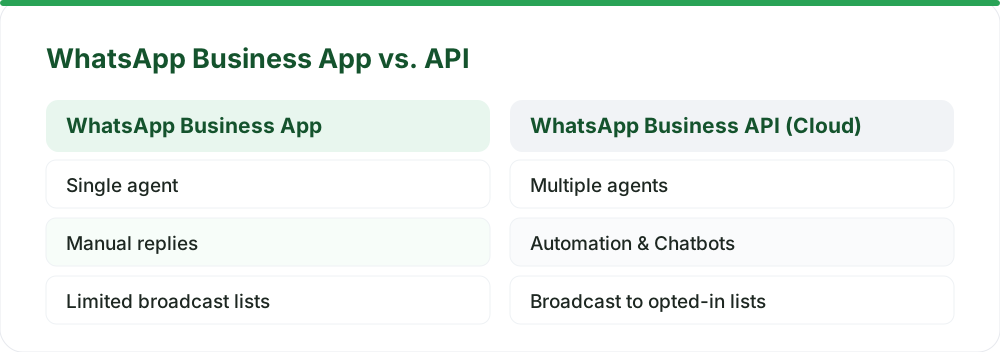
WhatsApp broadcasts are efficient for sending one message to many. But they aren't suitable for every situation. You trade personalization for scale. Think about customer support. If a customer has a specific issue, a broadcast message is inappropriate. They expect a direct, individual response. For these cases, a WhatsApp chatbot for business or a shared team inbox is better.
Broadcasts are best for:
- Announcements (new products, sales)
- General updates (service disruptions)
- Marketing campaigns to opted-in lists
For one-on-one customer support, a chatbot can handle queries automatically, routing complex issues to your team. This ensures a better customer experience. WaZappy offers advanced AI chatbots and a shared team inbox to handle these individual conversations efficiently, ensuring no customer query falls through the cracks.
| Feature | WhatsApp Broadcasts | Individual Chat / Chatbot | WhatsApp Catalog + UPI Payments |
| Use Case | Mass announcements, updates | Customer support, specific queries | Product display, direct sales |
| Consent Required | Yes (explicit opt-in) | Yes (implicit for response) | Yes (implicit for response) |
| Template Required | Yes (for initial message) | No (for user-initiated) / Yes (for business-initiated) | No (for user-initiated) / Yes (for business-initiated) |
| Scalability | High | Low to Medium | Medium |
| Personalization | Limited (via placeholders) | High | Medium |
| Automation Potential | Medium (list management) | High (chatbots, flows) | High (catalog browsing, checkout) |
What Happens When Your Quality Rating Drops?
If your quality rating turns yellow or red, Meta starts imposing restrictions. Initially, you might only be able to send templates to users who have opted in very recently. Then, you might only be allowed to send notifications, not marketing messages. If the rating stays poor, Meta can limit your ability to send any messages at all. Eventually, your WhatsApp Business account could be banned. This is why diligently managing opt-ins and opt-outs is so critical. It's not just about following rules; it's about keeping your communication channel open.
Infrared Techno, as a Meta Tech Provider on the official WhatsApp Business Platform (Cloud API), helps businesses navigate these requirements. We ensure your setup is compliant from day one, minimizing risks associated with quality ratings and template approvals. Learn more about our advanced features.
Frequently asked questions
Can I send any message I want in a broadcast?
No. All business-initiated messages, including the first message in a broadcast, must use a pre-approved template. Templates are reviewed by Meta to ensure they comply with WhatsApp's policies. You can explore our guide on common rejections and how to avoid them.
What if a customer replies to my broadcast?
If a customer replies to your broadcast message, it opens a 24-hour customer service window. You can then reply freely with any message type within that window without needing a template. If they don't reply within 24 hours, you'll need a template for any subsequent message.
How long does it take to get a template approved?
Template approval times can vary. Simple templates might be approved in minutes, while more complex ones, especially those with promotional content, can take a few days. It depends on Meta's review process at the time. You can check the status of your templates within the WaZappy dashboard.
What to do next
Managing WhatsApp broadcasts effectively involves understanding Meta's rules on templates, consent, and quality. By focusing on clear opt-ins, respecting opt-outs, and using approved templates, you can build a reliable communication channel. Ready to implement this for your business? Explore how WaZappy can simplify your WhatsApp strategy and help you send broadcasts compliantly.
Read next
All WhatsApp Business API guides →WhatsApp Automation for D2C and E-commerce Brands in India
Unlock explosive growth for your D2C or e-commerce brand in India with WhatsApp automation. Discover how the WhatsApp Business API can transform customer engagement, boost sales, and streamline operations.
Setting Up a Shared WhatsApp Team Inbox: Never Leave a Customer Waiting
Learn how to set up a shared WhatsApp team inbox to manage customer conversations efficiently, reduce wait times, and improve your support experience.
Answer Customer Questions with AI on WhatsApp from Your Knowledge Base
Leverage AI on WhatsApp to instantly answer customer questions using your own knowledge base. Discover how to set up a WhatsApp chatbot for business that scales, improves efficiency, and offers 24/7 support.
Want this on your WhatsApp?
WaZappy is the WhatsApp Business API platform with every advanced feature built in — start free and connect your number in minutes.
Start free on WaZappy