
Click-to-WhatsApp Ads: Turn Ad Clicks into Qualified Conversations in India
WaZappy · 7 September 2026 · 7 min read
In this article10 sections
- Key Takeaways
- Stop Wasting Ad Spend: Get Conversations, Not Just Clicks
- How Click-to-WhatsApp Ads Work for Indian Businesses
- Setting Up Your First Click-to-WhatsApp Ad
- Leverage WhatsApp Chatbots for Instant Lead Qualification
- Turn Conversations into Sales with WhatsApp Catalog & UPI Payments
- Manage High Volumes with WhatsApp Automation and Broadcasts
- WhatsApp Business API vs. Traditional Communication Channels
- Frequently Asked Questions
- What to do next
Key Takeaways
Key takeaways
- Click-to-WhatsApp ads directly connect interested users from ads into a chat, bypassing passive website visits.
- Automate initial responses with a WhatsApp chatbot to qualify leads instantly and improve customer experience.
- Integrate WhatsApp Catalog and UPI payments to facilitate direct sales within the chat interface.
- Leverage WhatsApp Business API features like automation and broadcasts for efficient customer engagement at scale.
Stop Wasting Ad Spend: Get Conversations, Not Just Clicks
Your ads are getting clicks. That's good, right? But are those clicks turning into actual customers or just more website visitors who leave? Many Indian businesses pour money into Facebook, Instagram, and Google ads, only to see users bounce. You need a way to capture that immediate interest. You need to turn clicks into qualified conversations.
That’s exactly what Click-to-WhatsApp ads do. They bypass the usual website detour. Instead, they take potential customers straight to a live chat on WhatsApp. Think about it: someone sees your product on Instagram. They're curious, but maybe not ready to fill out a lengthy form. A click-to-WhatsApp ad lets them tap a button and start talking to you right then and there. This means you get warmer leads. They’ve actively chosen to engage. It’s a direct line to interested prospects.
How Click-to-WhatsApp Ads Work for Indian Businesses
The process is straightforward. You create an ad on platforms like Meta (Facebook/Instagram) or Google. Within the ad, you add a button or link. This link, when clicked, opens a pre-filled WhatsApp chat with your business number. The user hits send, and the conversation begins.
This is far more effective than just listing your WhatsApp number. With click-to-WhatsApp ads, the user journey is streamlined. They see your ad, get intrigued, and with one tap, they're chatting with you. No lost interest. No extra steps. It's about meeting your customers where they already are – on WhatsApp, an app they use daily.
The magic is in the pre-filled message. You can set this message to give you immediate context. For instance, if you're advertising a new saree collection on Instagram, the pre-filled message could be: 'Hi, I'm interested in the new sarees I saw on Instagram'. This tells you exactly which ad brought them in and what they're looking for. This context is invaluable for your sales team.
Setting Up Your First Click-to-WhatsApp Ad
Creating these ads is simple, especially if you're familiar with Meta Ads Manager. The core component is the link you generate. You'll need your WhatsApp Business phone number in the international format, like +919876543210.
The basic link structure is:
https://wa.me/?text= For example, if your number is +919876543210 and you want the pre-filled message to be 'Hello WaZappy, I saw your ad about click-to-WhatsApp ads', your link would look like this:
https://wa.me/+919876543210?text=Hello%20WaZappy%2C%20I%20saw%20your%20ad%20about%20click-to-WhatsApp%20adsRemember to URL-encode your message. This means replacing spaces with `%20` and other special characters appropriately.
When building your ad in Meta Ads Manager, you’ll select 'WhatsApp' as the destination. You can then input this link, or the platform will guide you to create it.
Leverage WhatsApp Chatbots for Instant Lead Qualification
Once a user clicks your ad and sends that first message, you need to respond. This is where a WhatsApp chatbot for business becomes critical. If it's outside business hours or your team is swamped, an automated response keeps the user engaged. They don't have to wait and lose interest.
A well-designed chatbot can:
- Acknowledge the user's inquiry immediately.
- Ask qualifying questions to understand their needs better.
- Provide instant answers to common questions.
- Collect basic lead information like name or location.
- Route complex queries to a live agent.
For example, if someone clicks an ad for your latest IT services, a chatbot can ask: 'What specific IT challenge are you facing?'. Based on the reply, it can offer relevant service details or direct them to a sales agent. This immediate, automated engagement is key. It keeps the user's momentum going and ensures you capture valuable information, even when your team isn't available 24/7.
This level of instant, helpful interaction mirrors the speed of messaging and keeps potential customers engaged.
Turn Conversations into Sales with WhatsApp Catalog & UPI Payments
For e-commerce businesses in India, click-to-WhatsApp ads combined with advanced features can create a powerful sales funnel. You can guide customers from initial interest to purchase, all within WhatsApp.
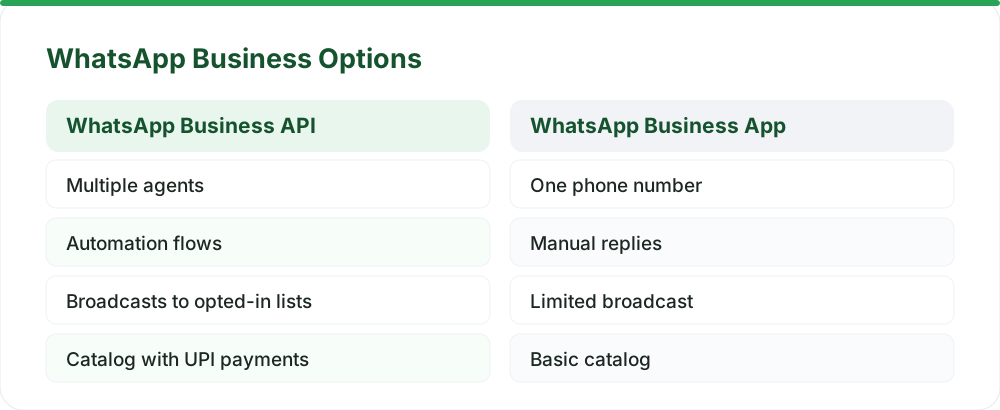
With the WhatsApp catalog UPI payments feature, you can showcase products directly within WhatsApp. Customers browse your catalog, add items to a cart, and then pay instantly using UPI, right within the chat. This removes common friction points in online shopping.
Imagine a customer clicks your ad for a kurta. The chatbot guides them, shows the product catalog, helps them select size and colour, and adds it to their cart. Then, with a simple UPI payment link generated through the platform, they complete the purchase. This entire process happens within WhatsApp, making it incredibly convenient and fast. This integration makes WhatsApp a compelling channel for sales. It's not just for marketing; it's a complete commerce tool.
WaZappy, from Infrared Techno, a Meta Tech Provider, offers these advanced features. You can build sophisticated, no-code chatbots that handle complex conversations, qualify leads, and process orders directly on WhatsApp, all integrated with your product catalog and UPI payment options.
Ready to see how easy it is to turn your ad clicks into qualified conversations and sales? Start free on WaZappy.
Manage High Volumes with WhatsApp Automation and Broadcasts
As your click-to-WhatsApp ad campaigns gain traction, you'll see more incoming messages. This is where robust WhatsApp automation and WhatsApp broadcast software features become essential. Managing these conversations efficiently is key to scaling your business.
Automation can handle repetitive tasks, route messages to the right teams, and provide instant support. For example, if a customer asks about their order status, an automated flow can fetch that information and respond, freeing up your support agents for more complex issues. This ensures timely responses and customer satisfaction.
WhatsApp broadcasts, when used correctly with opt-in lists, are powerful for re-engaging customers. You can send updates about new products, special offers, or important announcements directly to users who have agreed to receive them. This is often more effective than email for many types of communication in India.
The key is responsible use. Focus on providing value to your audience. Ensure your broadcasts are relevant and that users have an easy way to opt-out if they wish. This maintains a healthy sender score and ensures your messages reach those who want to hear from you. Infrared Techno, as a Meta Tech Provider, ensures that WaZappy adheres to all WhatsApp Business Platform policies, helping you maintain account health and deliver great customer experiences.
For more on managing broadcasts effectively, check out our guide on WhatsApp Broadcasts: How Template Approval, Opt-Outs, and Quality Ratings Really Work.
WhatsApp Business API vs. Traditional Communication Channels
When considering how to engage customers, it's helpful to compare WhatsApp Business API with older methods like SMS and email. While SMS and email have their place, WhatsApp offers a more interactive and immediate experience.
SMS is direct but lacks rich media and interactive elements. It's often used for critical alerts but can feel impersonal. Email allows for more detail but suffers from low open rates and a slower response time. Users often check emails less frequently than WhatsApp messages.
The WhatsApp Business API, on the other hand, allows for rich media, interactive buttons, catalogs, and real-time chat. This leads to higher engagement and conversion rates. It's about meeting customers on a platform they actively use and prefer for quick communication.
| Feature | WhatsApp Business API | SMS | |
|---|---|---|---|
| Interactivity | High (buttons, lists, media) | Low (text only) | Medium (links, basic formatting) |
| Engagement Rate | Very High | Medium | Low |
| Response Time | Instant / Real-time | Minutes to Hours | Hours to Days |
| Rich Media Support | Yes (images, videos, docs) | Limited (MMS) | Yes |
| Cost Per Message | Conversation-based (Meta rates) | Fixed per message | Low per message |
| Customer Preference | High | Medium | Medium |
| Automation Potential | Very High (chatbots, flows) | Limited | Medium |
For businesses in India looking for **customer engagement**, WhatsApp offers a significant advantage in immediacy and interaction.
Frequently Asked Questions
What is the best way to structure a click-to-WhatsApp ad?
Use a clear, benefit-driven headline and compelling visuals. The call-to-action button should be prominent. The pre-filled message should give context about the user's interest, and you can offer immediate value like a discount code to incentivize the click.
How do I ensure my WhatsApp number is ready for API integration?
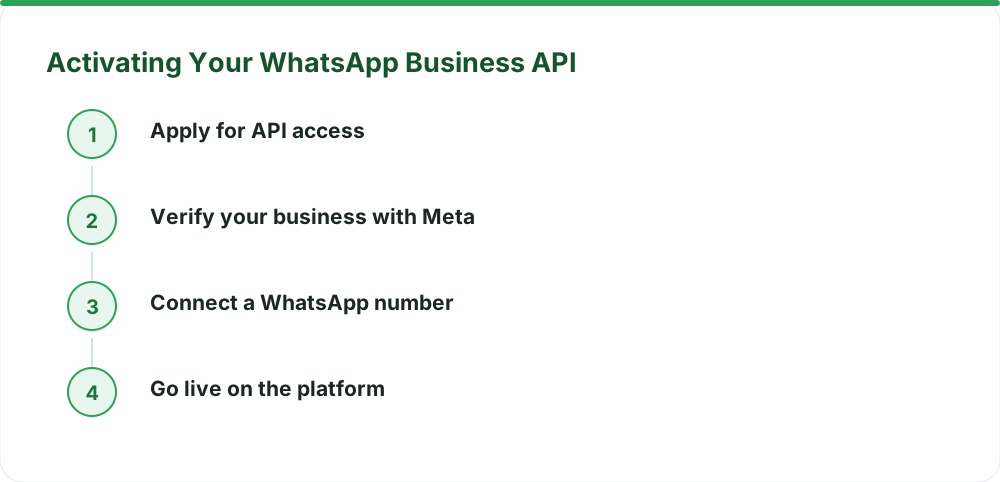
Your number must not be currently active on the WhatsApp or WhatsApp Business app. If you have an existing number, you can migrate it to the Business API without losing chat history. Ensure you have a dedicated phone number for this purpose. You can learn more about the process in our guide on Migrating Your WhatsApp Number to the Business API.
Can I use click-to-WhatsApp ads for lead qualification?
Absolutely. By pairing click-to-WhatsApp ads with a chatbot, you can ask initial qualifying questions immediately after the user initiates contact. This helps segment leads and pass warmer prospects to your sales team, improving your lead generation efforts.
What to do next
Ready to turn your ad clicks into engaged conversations and qualified leads? Start by defining the exact interaction you want users to have when they click your ad. Then, set up your WhatsApp Business API account to handle these incoming messages efficiently and provide an exceptional customer experience.
Read next
All WhatsApp Business API guides →WhatsApp Automation for D2C and E-commerce Brands in India
Unlock explosive growth for your D2C or e-commerce brand in India with WhatsApp automation. Discover how the WhatsApp Business API can transform customer engagement, boost sales, and streamline operations.
WhatsApp Drip Campaigns: Recovering Abandoned Carts in India
Turn lost sales into revenue. Learn how WhatsApp drip campaigns, powered by automation and UPI payments, can recover abandoned carts for your Indian business.
WhatsApp for Restaurants: Direct Orders Without the Aggregator Commission
Stop paying hefty commissions to food aggregators. Learn how to use the WhatsApp Business API to take direct orders, boost repeat business, and own your customer relationships.
Want this on your WhatsApp?
WaZappy is the WhatsApp Business API platform with every advanced feature built in — start free and connect your number in minutes.
Start free on WaZappy