
Why Bulk WhatsApp Senders Get Numbers Banned, and What to Use Instead
WaZappy · 10 August 2026 · 8 min read
In this article10 sections
- Why Unofficial Bulk WhatsApp Senders Lead to Bans
- The WhatsApp Business App vs. The API: A Clear Difference
- Why Those 'Cheap' Bulk Senders Are a Trap
- The Official Way: WhatsApp Business Platform (API)
- How Message Templates Keep You Compliant
- Choosing the Right WhatsApp Business API Provider in India
- Getting Started with the WhatsApp Business Platform
- What About the Green Tick Verification?
- Frequently asked questions
- What to do next
Key takeaways
- Unofficial bulk WhatsApp senders violate WhatsApp's terms of service, leading to permanent number bans.
- The free WhatsApp Business App is for small businesses and single devices, not for bulk messaging.
- The official WhatsApp Business Platform (API) offers scalability, automation, and compliance for businesses.
- Infrared Techno, the company behind WaZappy, is a Meta Tech Provider for the official WhatsApp Business Platform.
Why Unofficial Bulk WhatsApp Senders Lead to Bans
You need to reach your customers. Send promotions, updates, or order confirmations. You find a tool promising to send thousands of messages at once. You use it. Then, your WhatsApp number gets banned. This is a common and frustrating problem for businesses in India.
The reason is simple: you're likely using an unofficial tool. These tools operate outside the official WhatsApp system. They automate the standard WhatsApp app or use other risky methods. WhatsApp has strict rules to protect user experience and prevent spam. These unofficial senders break those rules. This leads to your number being flagged and banned, often permanently. It’s frustrating, but there’s a better, official way.
The WhatsApp Business App vs. The API: A Clear Difference
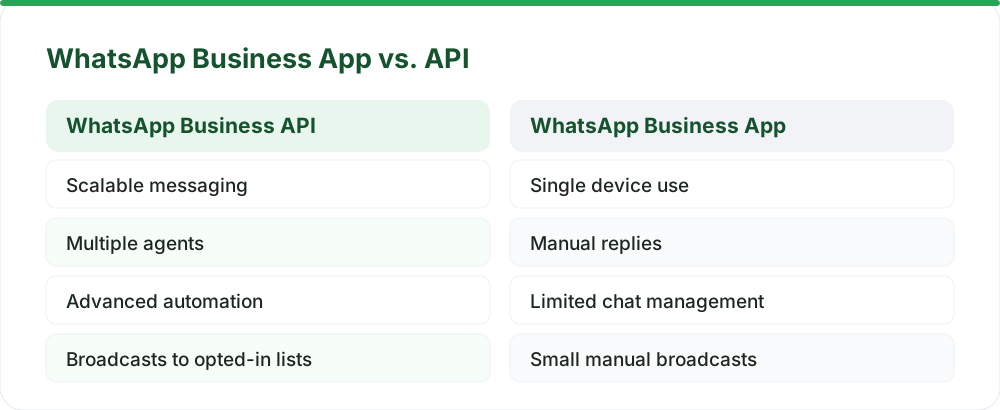
Many small businesses start with the free WhatsApp Business App. It’s great for basic needs. You get a business profile, quick replies, and can manage a small number of chats. You can even upload a product catalog. However, it’s designed for one person or a small team on a single phone.
It simply isn't built for sending bulk messages reliably or automating conversations at scale. Trying to force it for mass outreach is a direct path to a ban.
The WhatsApp Business Platform (API) is fundamentally different. It’s built for scale and automation. It allows multiple team members to manage conversations from a central dashboard. You can connect it to your CRM, your website, or other business tools. This is what you need for serious customer communication, marketing, and support.
Why Those 'Cheap' Bulk Senders Are a Trap
Let's be direct. Those cheap bulk sender tools you find online? They are incredibly risky. They often work by automating the standard WhatsApp app or using unofficial methods. Think of it like trying to run a call center using just a single mobile phone – it's not designed for that volume or intensity.
WhatsApp's algorithms are designed to detect this unusual activity. Sending too many messages too quickly, especially to people who haven't explicitly opted in, looks exactly like spam. The platform's primary goal is user safety and a good experience for everyone. Mass, unsolicited messages directly harm that.
These tools often require you to upload contact lists. You might not even know if those contacts actually want to hear from you. This is a major violation of WhatsApp's terms of service. When a number gets banned, it's often permanent. Losing your business number means losing contact with customers. It means missed sales and damaged trust. The true cost of a banned number is far higher than any cheap sender tool.
The Official Way: WhatsApp Business Platform (API)
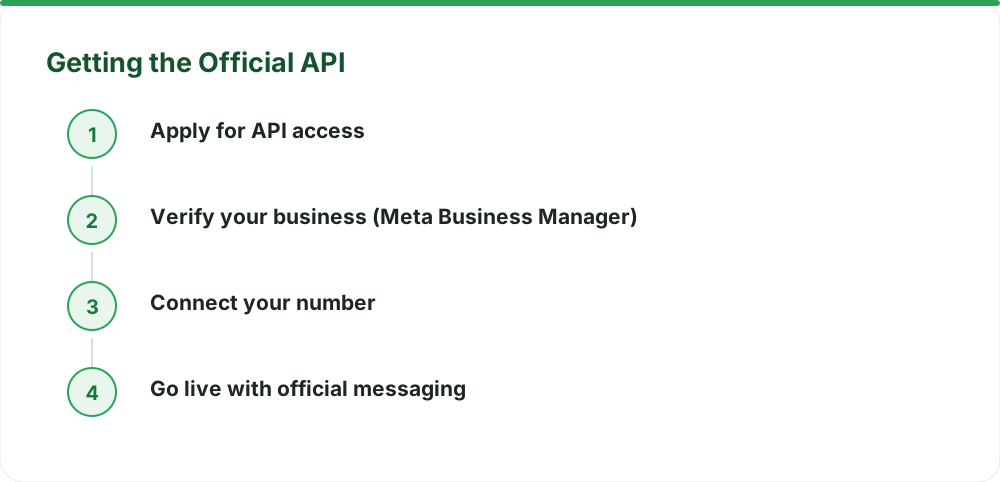
The WhatsApp Business Platform is the official, approved way to use WhatsApp for business communication at scale. It’s the only way to send messages reliably without risking your number.
Infrared Techno, the company behind WaZappy, is a Meta Tech Provider on the official WhatsApp Business Platform (Cloud API). This means we work directly with Meta to offer robust, compliant solutions. With the API, you send messages using pre-approved message templates.
These templates ensure your messages are clear, useful, and expected. They fall into categories like marketing, utility, and authentication. This structure helps WhatsApp understand your communication and prevents spam. You can send these templates to users who have explicitly opted in to receive messages from you. You can also respond to customer inquiries within a 24-hour window using free-form messages.
Opt-Ins Are Key. WhatsApp is very clear about this: you must get explicit consent (an opt-in) from your customers before sending them marketing messages. This means they need to actively agree to receive communications from your business on WhatsApp. This can be done through a checkbox on your website during checkout, a form, or even a verbal confirmation. Without a proper opt-in, sending messages can lead to user complaints and potential bans, even on the official API.
To ensure you're always compliant and communicating effectively, WaZappy helps manage opt-ins and message templates. Our platform provides tools to track consent and ensures your broadcasts adhere to Meta's policies, helping you maintain a good quality rating.
How Message Templates Keep You Compliant
Message templates are crucial for initiating conversations with customers, especially for notifications or promotions. You submit these templates to Meta for approval. Once approved, you can use them anytime.
For example, a template might look like this:
Hi {{1}}, your order {{2}} has shipped! Track it here: {{3}}.
Here, {{1}}, {{2}}, and {{3}} are placeholders for customer-specific information like their name, order number, and tracking link. This system ensures businesses communicate responsibly. Customers receive relevant information without being overwhelmed by unsolicited messages.
The official WhatsApp Business Platform is the only reliable way to send messages at scale. Unofficial methods are a fast track to getting your number banned.
Choosing the Right WhatsApp Business API Provider in India
When you decide to move to the API, you need a platform to manage it. This is where choosing the right partner matters. You want a provider that understands the Indian market and offers the tools you need.
Look for features like automation, a shared inbox for your team, and easy integration capabilities. The official WhatsApp Business Platform has conversation-based pricing. Meta bills these conversation charges directly to you. WaZappy, as a Meta Tech Provider, adds no markup to these rates. We believe in transparent pricing. You can learn more about the specifics on our pricing page.
When looking for the best WhatsApp Business API provider in India, consider their technical capabilities. Do they offer advanced features like AI chatbots? Can you build no-code automation flows easily using a visual builder? Do they support features like catalog integration with UPI payments for a complete selling experience on WhatsApp? The platform is designed to be powerful and flexible.
If you're tired of dealing with banned numbers and want a professional, scalable solution, now is the time to explore the official API. WaZappy provides the tools you need to communicate effectively and compliantly.
Getting Started with the WhatsApp Business Platform
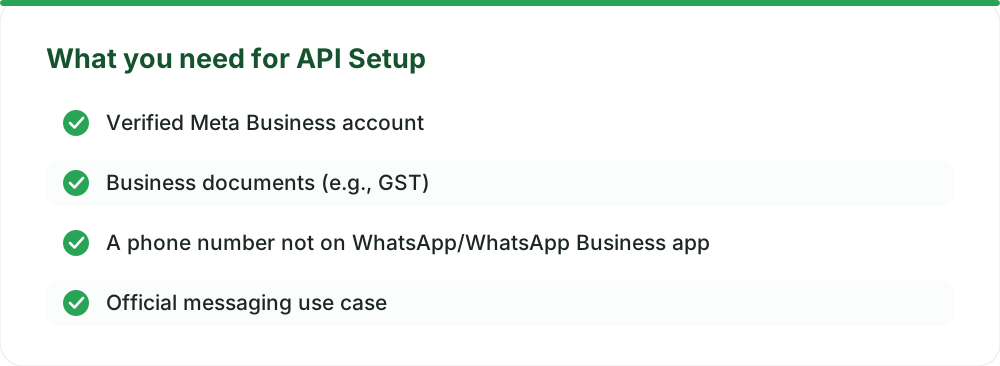
Setting up the WhatsApp Business Platform might sound complex, but it’s straightforward with the right guidance. The core requirement is a verified Meta Business account. You'll also need to provide some business details and documentation. Infrared Techno, as a Meta Tech Provider, helps streamline this process.
Most businesses can be live on the same day once their Meta Business account is verified and documents are in order. There is no setup fee for the WhatsApp Business Platform itself. If you need help with the setup and configuration, an optional assisted setup service is available for ₹2,499 + GST, charged once. This ensures you get running smoothly without technical headaches.
What About the Green Tick Verification?
The green tick on WhatsApp signifies that a business is authentic and notable. Getting verified is a separate process handled directly by Meta. It involves a review of your business's presence and notability. While no provider can speed this up, having a verified Meta Business account is a prerequisite. The verification process itself can take anywhere from a few days to a couple of weeks. You can read more about the requirements on our guide to Green Tick verification.
Frequently asked questions
Can I use my existing WhatsApp number?
Yes, you can migrate your existing WhatsApp number to the Business Platform. The number must not be active on the standard WhatsApp or WhatsApp Business app simultaneously. We can help you migrate your number without losing chat history. See our guide on migrating your number.
How much does it cost?
There are no setup fees. Meta charges conversation-based rates, which vary depending on the message type (user-initiated or business-initiated) and country. WaZappy, as a Meta Tech Provider, passes these Meta rates directly to you without any markup. We also offer a free plan with no expiry, subject to certain limits detailed on our pricing page.
Is the WhatsApp Business API free?
The WhatsApp Business Platform itself isn't free in the sense of unlimited messaging. Meta charges for business-initiated conversations. However, user-initiated conversations (customer messages you reply to within 24 hours) are often free. WaZappy offers a free plan for basic usage, and our pricing for paid plans is competitive, reflecting Meta's direct conversation charges. You can find more details on WhatsApp Business API costs in India.
What to do next
Stop risking your business number with unofficial tools. Embrace the official, reliable, and scalable solution: the WhatsApp Business Platform. It’s the only way to ensure long-term communication success with your customers in India and be confident your number won't get banned. Explore the advanced features and start communicating professionally.
Read next
All WhatsApp Business API guides →Cut COD Returns by 40% with WhatsApp Order Confirmation
Reduce COD returns and fake orders with a smart WhatsApp order confirmation flow. Learn how real-time verification and interactive messages can save your business money and improve customer experience.
Navigating WhatsApp Business API Pricing in India from October 1, 2026
Meta is changing WhatsApp Business API pricing in India from October 1, 2026. Understand new charges for service, utility, and AI messages, and how to optimize your costs.
Click-to-WhatsApp Ads: Turn Ad Clicks into Qualified Conversations in India
Learn how to use Click-to-WhatsApp ads to generate warmer leads and drive sales for your Indian business. Discover how automation and catalogs can boost engagement.
Want this on your WhatsApp?
WaZappy is the WhatsApp Business API platform with every advanced feature built in — start free and connect your number in minutes.
Start free on WaZappy