
Build Your First WhatsApp Chatbot Without Writing Code
WaZappy · 17 August 2026 · 6 min read
In this article10 sections
- Key Takeaways
- Automate Customer Queries with a WhatsApp Chatbot
- Why Automate with a WhatsApp Chatbot?
- Choosing the Right Tools for No-Code Chatbots
- Designing Your First Chatbot Flow
- Leveraging WhatsApp for Sales and Marketing
- Integrating Payments and Catalogs
- Advanced Features: AI and Team Collaboration
- Frequently asked questions
- What to do next
Key Takeaways
Key takeaways
- You can build a WhatsApp chatbot without any coding using visual flow builders.
- A WhatsApp chatbot automates customer queries, sales, and support, saving time and resources for your business.
- Businesses can leverage features like WhatsApp catalog with UPI payments for easier transactions directly within the app.
- No-code platforms simplify setting up WhatsApp automation and click to WhatsApp ads for lead generation.
Automate Customer Queries with a WhatsApp Chatbot
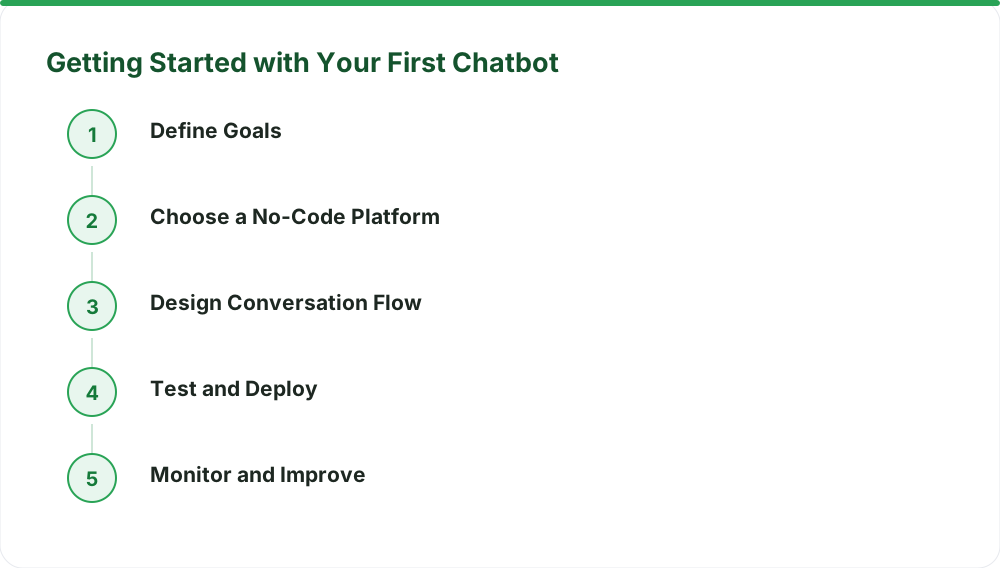
Tired of missing customer messages after hours? Do you wish you could answer common questions instantly, even when your team is offline? Many Indian businesses struggle with this. Customers expect quick replies. Waiting too long means lost sales and unhappy clients. What if you could automate these conversations? You can. Building a **WhatsApp chatbot for business** doesn't require a team of developers anymore. You can set up your first bot using tools that let you drag and drop. This means faster support, more sales, and a happier customer base. This guide will show you how to get started. We’ll cover the basics of creating a chatbot. You’ll learn about common uses and how to set one up yourself. No technical background needed. We'll focus on practical steps so you can see results quickly.
Why Automate with a WhatsApp Chatbot?
Think about your daily customer interactions. How many are repetitive? Questions about product availability, store hours, delivery status, or basic troubleshooting. A chatbot can handle these. It frees up your human agents for complex issues. This improves efficiency. It also ensures customers get an answer right away. This is crucial in India’s competitive market.
Beyond customer service, chatbots can drive sales. They can guide users through product discovery. They can even help complete purchases. Imagine a customer asking about a specific product. The bot can show them the item, provide details, and offer a link to pay. This is where features like **WhatsApp catalog UPI payments** become incredibly useful. Customers can browse, select, and pay all within WhatsApp. This reduces friction and increases conversion rates.
Choosing the Right Tools for No-Code Chatbots
The key to building without code is the platform you choose. You need a tool that offers a visual interface. This means you can design conversation flows by connecting blocks. Think of it like drawing a flowchart. You map out the customer's journey. Each step is a message, a question, or an action.
For businesses in India, having a robust platform is essential. You need features that cater to local needs. This includes easy integration with payment systems like UPI. You also need the ability to send targeted messages. This is where WaZappy comes in. As a Meta Tech Provider on the official WhatsApp Business Platform (Cloud API), WaZappy offers a visual builder and advanced features needed for **WhatsApp automation**.
Designing Your First Chatbot Flow
Let’s walk through a simple example. Suppose you run a small clothing boutique. A common query is about delivery timelines. You can build a flow for this.
- Welcome Message: When a customer messages your business number, the bot sends a greeting. "Namaste! Thanks for contacting [Your Boutique Name]. How can I help you today?"
- Menu Options: The bot then presents options. "Please select an option: 1. Delivery Info 2. Track Order 3. Product Inquiry 4. Speak to Agent"
- Delivery Info Flow: If the customer selects '1', the bot replies: "We ship across India! Standard delivery takes 3-5 business days. Express delivery is available for ₹200, taking 1-2 business days."
- Fallback: If the customer types something unexpected, or selects '4', the bot can say: "I'm sorry, I didn't understand that. Let me connect you to our support team."
This entire flow can be built by dragging and dropping elements. You define the text, the buttons, and the logic. You don't need to write a single line of code.
Leveraging WhatsApp for Sales and Marketing
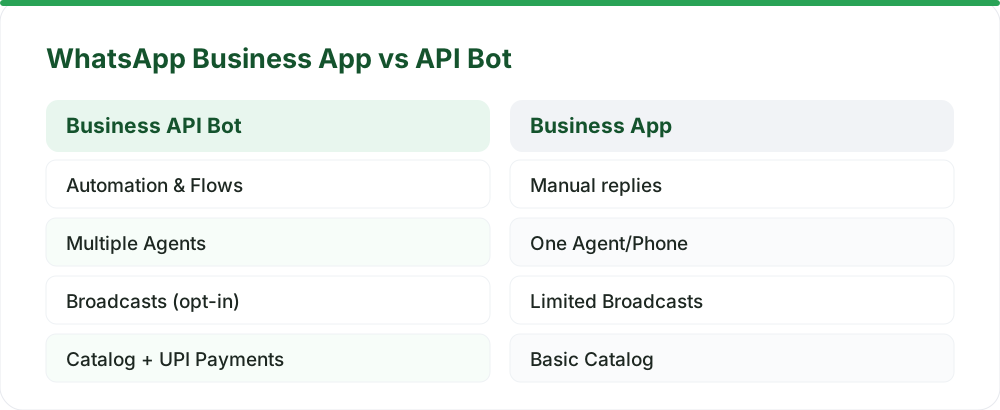
A chatbot is just the start. WhatsApp offers powerful tools for growth. **WhatsApp broadcast software** allows you to send messages to many customers at once. However, this must be done responsibly. You can only message users who have opted in to receive communications from you. This is key to avoiding bans and respecting user privacy. You can use broadcasts for new arrivals, special offers, or event invitations.
Combine this with **click to WhatsApp ads**. These ads, run on platforms like Facebook and Instagram, have a button that directly opens a WhatsApp chat with your business. This is a highly effective way to capture leads. When a customer clicks the ad, your chatbot can be ready to engage them immediately, perhaps offering a discount for their first purchase. This entire setup is simplified with platforms that offer robust campaign management tools.
Integrating Payments and Catalogs
For e-commerce businesses, the ability to sell directly on WhatsApp is a major advantage. The WhatsApp Catalog feature lets you display your products. Customers can browse items, view details, and add them to a cart. This is powerful on its own. When you combine this with UPI payment integration, you create a smooth buying experience.
Customers can select items from your catalog, and the bot can generate a UPI payment request or provide a UPI ID for them to pay. Once payment is confirmed, the order can be processed. This removes the need for customers to navigate away from WhatsApp to complete their purchase, significantly reducing cart abandonment. Learn more about how this works end-to-end on our [WhatsApp Catalog, Cart, and UPI Payments guide](/blog/whatsapp-catalog-cart-upi-payments-india).
Advanced Features: AI and Team Collaboration
As your business grows, your chatbot needs can become more sophisticated. Many platforms now offer AI integrations. You can connect your chatbot to AI models to understand more complex queries and provide more human-like responses. Remember, AI features typically run on your own API key from providers like OpenAI. WaZappy integrates with your chosen AI provider, making advanced automation accessible.
For larger teams, managing conversations can be chaotic. A shared team inbox is essential. This allows multiple team members to handle incoming messages. It provides context, assigns conversations, and prevents duplicate replies. This ensures every customer query is addressed promptly and efficiently, a key benefit of using the WhatsApp Business API.
Frequently asked questions
How long does it take to set up a WhatsApp chatbot?
With a no-code platform like WaZappy, you can build a basic chatbot flow in under an hour. Getting the WhatsApp Business API number approved by Meta can take anywhere from a few hours to a few days, depending on how quickly you provide the necessary documents and have a verified Meta Business account. Most businesses go live the same day once requirements are met.
Can I use my existing WhatsApp number?
Yes, you can migrate your existing WhatsApp number. However, the number cannot be active on the WhatsApp or WhatsApp Business app when you connect it to the Business API. You will need to ensure it's switched over properly to avoid disruptions. WaZappy provides guidance on [migrating your number without losing chats](/blog/migrate-whatsapp-number-business-api-without-losing-chats).
What are the costs involved?
There is no setup fee for the WaZappy platform itself. Meta bills conversation charges directly at their rates, and WaZappy adds no markup. Optional assisted setup is available for a one-time fee of ₹2,499 + GST. You can explore the exact costs on our [pricing page](/pricing).
What to do next
Building your first WhatsApp chatbot without code is achievable and highly beneficial for Indian businesses. Start by defining the key customer interactions you want to automate. Then, explore a no-code platform designed for the WhatsApp Business API. WaZappy, a Meta Tech Provider, offers a free trial to help you get started.
Read next
All WhatsApp Business API guides →Sell Directly on WhatsApp: Catalog, Cart, and UPI Payments for Indian Businesses
Turn your WhatsApp chats into a storefront. Learn how to set up WhatsApp catalogs, carts, and UPI payments to sell directly to Indian customers, boosting sales and simplifying checkout.
Setting Up a Shared WhatsApp Team Inbox: Never Leave a Customer Waiting
Learn how to set up a shared WhatsApp team inbox to manage customer conversations efficiently, reduce wait times, and improve your support experience.
WhatsApp Drip Campaigns: Recovering Abandoned Carts in India
Turn lost sales into revenue. Learn how WhatsApp drip campaigns, powered by automation and UPI payments, can recover abandoned carts for your Indian business.
Want this on your WhatsApp?
WaZappy is the WhatsApp Business API platform with every advanced feature built in — start free and connect your number in minutes.
Start free on WaZappy