
WhatsApp Conversation Categories: Marketing, Utility, Authentication Rates in 2026
WaZappy · 6 August 2026 · 7 min read
In this article13 sections
- Understanding WhatsApp Conversation Categories for 2026 Pricing
- The Three Main WhatsApp Conversation Categories
- User-Initiated Conversations
- Business-Initiated Conversations
- WhatsApp Business API Pricing in India: What to Expect in 2026
- Optimizing Costs with Conversation Categories
- Use the Right Category
- Leverage User-Initiated Conversations
- Be Mindful of the 24-Hour Window
- Automate Wisely
- WhatsApp Green Tick Verification and Activation Time
- Frequently asked questions
- What to do next
Key takeaways
- WhatsApp conversations are priced in 24-hour blocks, not per message.
- Three categories—Marketing, Utility, Authentication—determine the cost.
- User-initiated conversations are free for businesses to reply within 24 hours.
- Meta bills conversation charges directly; WaZappy adds no markup.
Understanding WhatsApp Conversation Categories for 2026 Pricing
Are you figuring out the costs for the WhatsApp Business API in India? You're not alone. Many businesses wonder how message pricing actually works. It’s not as simple as a flat rate per message. Meta, the company behind WhatsApp, uses conversation categories. These categories directly influence your WhatsApp Business API cost in India for 2026. Getting a grip on these categories is crucial for managing your WhatsApp Business API price per message effectively. Let's break down how Meta classifies messages and what it means for your budget.
The core of WhatsApp’s pricing model is the 'conversation' session. A conversation is a 24-hour window. This window starts when either your business or the user sends the first message. Meta charges for these conversation blocks, not for each individual message sent within that block. The category of your message dictates the rate. This is where Marketing, Utility, and Authentication messages become key.
The Three Main WhatsApp Conversation Categories
Meta has specific rules for each category. These rules ensure a good user experience and prevent spam. They also directly dictate the pricing. For 2026, these categories remain the primary drivers of cost.
User-Initiated Conversations
These are the simplest. When a customer messages you first, that opens a 24-hour conversation window. You can reply freely within this window, and there's no charge for these business-initiated replies. This is ideal for customer support queries that start with the user.
Business-Initiated Conversations
This is where the categories truly matter for pricing. When your business sends the first message in a 24-hour window, it falls into one of these types:
Marketing Messages
These messages aim to promote products or services. Think about new product launches, sale announcements, or special offers. Any message that isn't purely transactional or for authentication fits here. For example, sending a catalog update or a festive discount offer falls under marketing.
Marketing conversations generally have the highest price per conversation. This reflects their commercial intent.
Utility Messages
These messages facilitate an agreed-upon transaction or update a customer about an ongoing one. Examples include order confirmations, shipping updates, appointment reminders, or delivery status notifications. The key is that the user expects this information.
Utility messages typically cost less than marketing messages. They are seen as essential service updates.
Authentication Messages
These are for verifying a user's identity. This includes one-time passwords (OTPs), password reset codes, or other security-related alerts. For instance, when you get an OTP to log into your bank account via WhatsApp.
Authentication messages usually have the lowest conversation rate. Meta recognizes their critical role in security and user verification.
It's important to remember: a single conversation can switch categories. If you reply to a user query (utility) with a promotional offer, Meta may reclassify the entire 24-hour conversation as marketing. Always be mindful of this when replying.
WhatsApp Business API Pricing in India: What to Expect in 2026
Meta sets the global conversation rates. These are then applied in local currencies. For India, this means rates are charged in Rupees (₹), plus applicable GST. It's important to note that Meta bills these conversation charges directly to the business account holder. Platforms like WaZappy add no markup to these Meta conversation charges. We simply provide the infrastructure and tools to manage your WhatsApp Business API.
Infrared Techno, the company behind WaZappy, is a Meta Tech Provider on the official WhatsApp Business Platform (Cloud API). This means we offer direct integration and advanced features.
The main cost components are:
- Meta Conversation Charges: As discussed, these depend on the category (Marketing, Utility, Authentication) and the country code of the recipient.
- Platform Fees: This is what a provider charges for using their platform. This covers the software, support, and any additional features.
Many businesses search for a free WhatsApp Business API option. While Meta's API itself isn't entirely free for high volumes, WaZappy offers a free plan with no expiry. This plan includes a certain number of free conversations per month. For higher volumes, paid plans become necessary. There is no setup fee, but assisted setup is optional at ₹2,499 + GST, charged once. We believe in transparent WhatsApp Business API pricing India, which is why our structure is clear.
When considering the WhatsApp Business API cost, look beyond just the per-message rate. Factor in the platform features you need. Do you need automation? AI chatbots? A shared team inbox? These are crucial for efficiency. WaZappy includes advanced features like automation & no-code flows, AI chatbots (using your own AI provider API key), broadcasts, catalog integration with UPI payments, and a shared team inbox. For developers, our REST API is available on relevant plans. Explore all our features here.
Optimizing Costs with Conversation Categories
How can you manage your WhatsApp Business API price per message effectively? Here are some practical tips:
Use the Right Category
Ensure your messages are correctly categorized. Sending a marketing message as a utility message can lead to higher costs if Meta reclassifies it. Stick to the definitions provided by Meta.
Leverage User-Initiated Conversations
Encourage users to message you first. Excellent customer support can turn an initial query into a positive interaction where you can offer further assistance without incurring new conversation charges. This is a key way to reduce your overall spend.
Be Mindful of the 24-Hour Window
Batch your business-initiated messages where possible. Sending multiple marketing messages spread over several days might incur multiple conversation charges. If they can be grouped into a single notification within a 24-hour window, it's more cost-effective. This is a common strategy for promotions or updates.
Automate Wisely
Use chatbots for initial queries. This can often resolve user issues without needing a human agent, potentially keeping the conversation within the utility or authentication categories. WaZappy's AI chatbot capabilities can help here, provided you use your own AI provider API key.
If you're looking for a WhatsApp Business API without monthly fee, it's crucial to understand what that entails. Often, this means you pay significantly higher per-message rates or are limited to very basic functionality. The free WhatsApp Business API plan on WaZappy offers genuine value, providing essential features without an expiry date. As your business scales, our paid plans offer more advanced capabilities and higher conversation limits at competitive rates. See our pricing plans.
WhatsApp Green Tick Verification and Activation Time
Getting the green tick on your WhatsApp Business profile adds credibility. This is a separate process managed by Meta. It involves verifying your business legitimacy. No provider can speed up this Meta review. It typically takes a few days to a couple of weeks after you submit your application and documentation. You can learn more about WhatsApp Green Tick Verification.
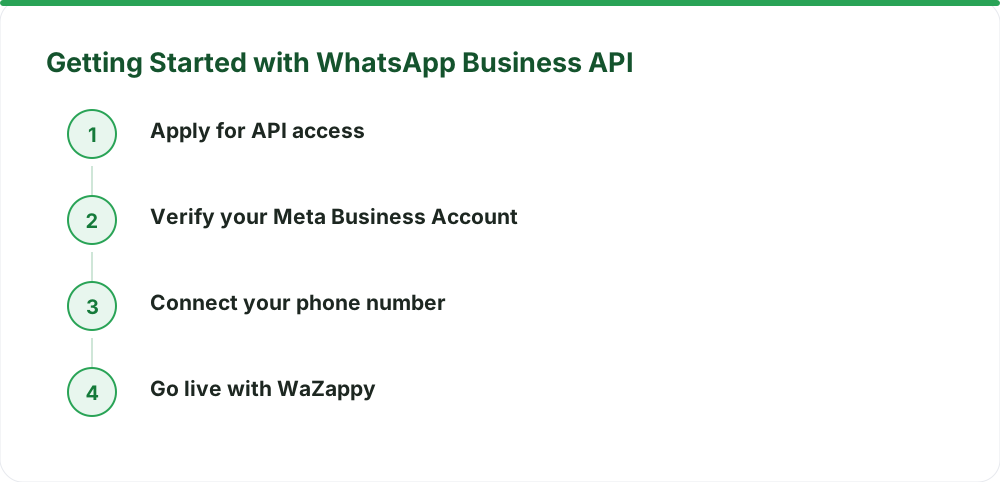
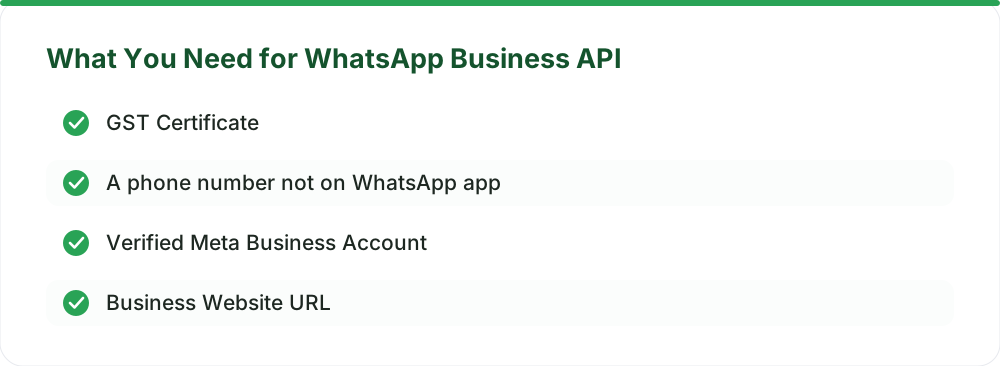
Most businesses can get activated on the WhatsApp Business API on the same day. This is contingent on having your documents ready and your Meta Business account properly set up. Migrating an existing number is also straightforward, provided it's not currently active on the regular WhatsApp or WhatsApp Business app. Learn how to migrate your WhatsApp number without losing chats.
Frequently asked questions
Is there a setup fee for the WhatsApp Business API?
No, there is no setup fee. Assisted setup is an optional service offered at ₹2,499 + GST, charged once.
Can I get the WhatsApp Business API for free?
Meta's API itself is not free for all usage tiers, but WaZappy offers a free plan with no expiry. This plan includes a certain number of free conversations per month, detailed on our pricing page.
How does Meta bill for conversations?
Meta bills conversation charges directly to your business account. These charges depend on the category (Marketing, Utility, Authentication) and the recipient's country code. WaZappy does not add any markup to these Meta rates.
What happens if I send a marketing message in a utility conversation?
If you send a marketing message within an ongoing conversation that was initiated under a different category (like Utility), Meta may reclassify the entire 24-hour conversation as Marketing, potentially leading to higher charges.
What to do next
Understanding WhatsApp conversation categories is vital for managing your communication costs effectively. By categorizing messages correctly and leveraging user-initiated conversations, you can optimize your WhatsApp Business API cost in India. Ready to implement these strategies with a robust platform? Start free on WaZappy today.
Read next
All WhatsApp Business API guides →Navigating WhatsApp Business API Pricing in India from October 1, 2026
Meta is changing WhatsApp Business API pricing in India from October 1, 2026. Understand new charges for service, utility, and AI messages, and how to optimize your costs.
Is the WhatsApp Business API Free in India? Meta vs. Provider Costs Explained
Understand the true cost of the WhatsApp Business API in India. Learn about Meta's conversation-based charges, provider fees, and how platforms like WaZappy offer value without hidden markups.
WhatsApp Business API Pricing in India — What You Actually Pay in 2026
Confused about WhatsApp Business API costs in India for 2026? Understand Meta conversation charges, platform fees, and how WaZappy provides clear, predictable pricing for your business.
Want this on your WhatsApp?
WaZappy is the WhatsApp Business API platform with every advanced feature built in — start free and connect your number in minutes.
Start free on WaZappy